
Bookkeeper
Actual balances at month-end
Updated 24 Nov 2026
This guide helps the Bookkeeper enter what each holder really holds at the end of a month, with proof.
Steps
- Open the Cashbook and tap Month-end at the top.
- Choose the Month. The newest month is chosen first.
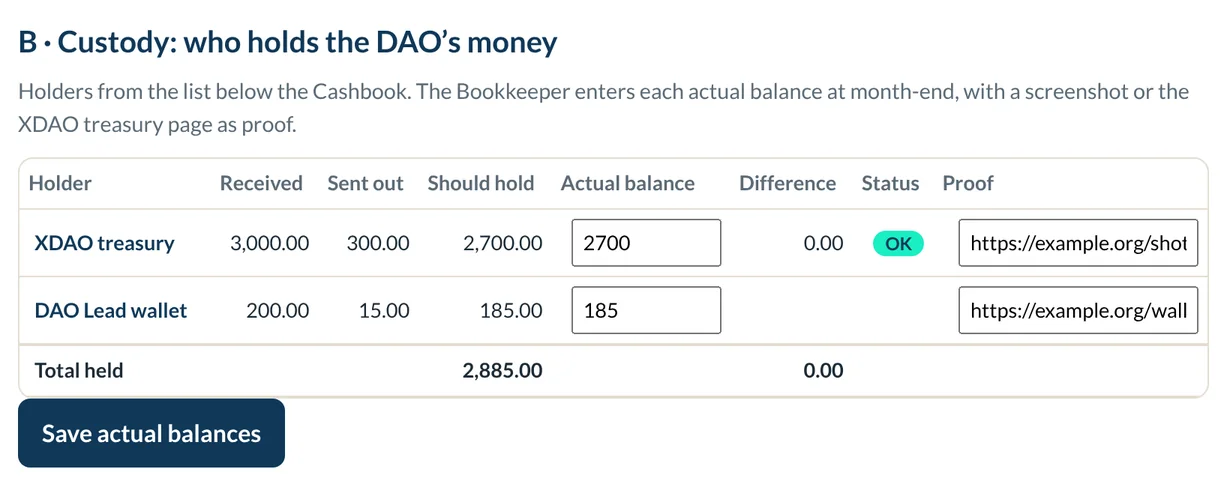
- Go to block B · Custody: who holds the DAO’s money. There is one row per holder, with Received, Sent out and Should hold.
- Check each holder's real balance on the last day of the month: the wallet, the bank or e-wallet account, or the XDAO treasury page.
- Type it in Actual balance, in USDT.
- In the Proof column, paste a link to a screenshot or to the XDAO treasury page.
- Tap Save actual balances. The Difference and Status of each row are updated.
- Look at each Status. OK means the actual balance equals Should hold. CHECK means there is a difference to explain.
Good to know
- Should hold = Received minus Sent out. Received counts the lines where the holder is in To (payee / holder); sent out counts the lines where it is in From (payer). Every line dated up to the end of the month counts.
- A difference usually means a line is missing, or a name in From or To is spelled differently from the holder's name. Fix the lines, then look again. See "Fix a line: edits, queries and correcting lines".
- Rows with an empty Actual balance are not saved. You can save some holders now and others later.
- Two checks in block A · Month-end checks use your numbers:
- Custody: money held (block B) minus current balance must be 0.
- Custody: unexplained difference vs actual wallet / bank balances must be 0.
- The Facilitator closes the month only when every check in block A reads OK. See the Facilitator page "Close the month".
- Once the month is closed, its actual balances can't be changed. The boxes are gone, and the Proof column shows a Proof link.
- Everyone in the DAO can read the Month-end view. Only the Bookkeeper enters actual balances.
If something goes wrong
- No holders yet: the Bookkeeper adds them under Holders. See "Set up the holders".
- Add a link to the evidence, starting with https:// A proof link is not a web address.
- This month is closed, so its balances stay as they were.
- You can’t change this. Only the Bookkeeper of this DAO enters actual balances.
- Couldn’t save. Check the fields and try again.