
Organizer
Set Karma
Updated 24 Nov 2026
This guide helps the Organizer set each member's Karma level for a month in the Karma Register.
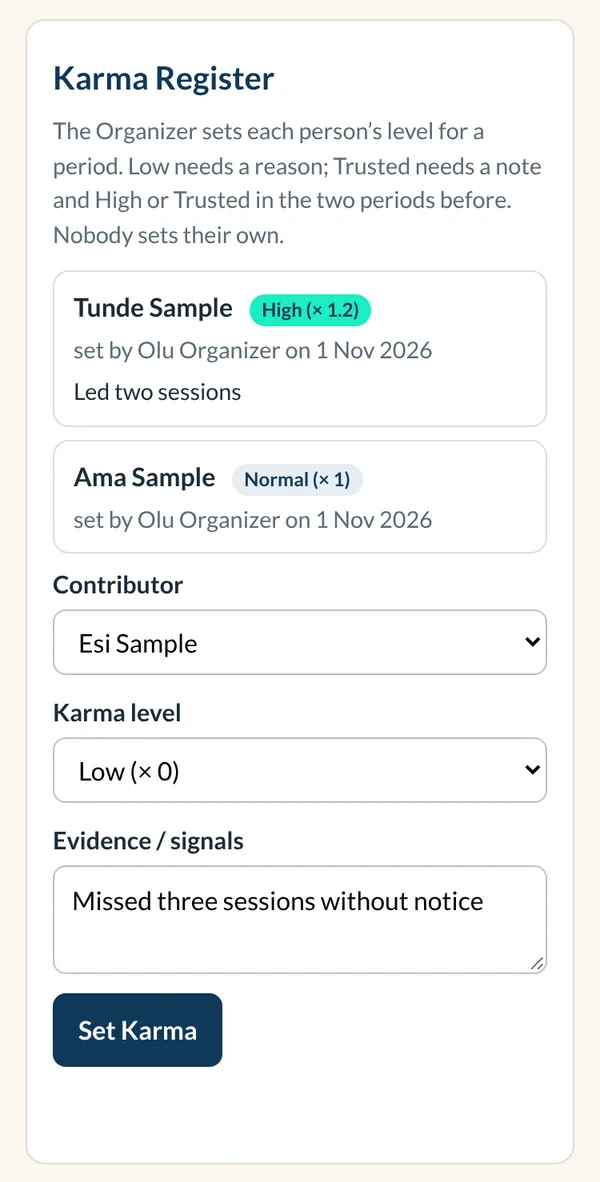
Steps
- Open your DAO and the KAT tab (or ☰ → Organizer → KAT).
- At the top, choose the Period (month).
- Scroll to the Karma Register. It lists the levels already set for that month.
- In the form, choose the Contributor. If they already have a level this month, the form shows it.
- Choose the Karma level. Each level shows its multiplier.
- Write the Evidence / signals behind the level. This is required for Low and Trusted.
- Tap Set Karma. The page says Saved. and the member shows with the level, "set by" your name and the date.
Good to know
- Karma weights the reward. The levels are Low (× 0.0), Normal (× 1.0), High (× 1.2) and Trusted (× 1.5). See Karma levels below the Config for when each applies.
- A member with no level for the month counts as Normal.
- Low needs a reason. Trusted needs a note, and the member must have High (or Trusted) in the two months before.
- Nobody sets their own Karma. You are not in the Contributor list.
- To change a level, set it again for the same member and month. Karma decisions are never deleted.
- Once a month is settled, its Karma can't change any more.
- Members see only their own Karma.
If something goes wrong
- Low and Trusted need the evidence or signals behind them. Fill in Evidence / signals.
- Trusted needs High or Trusted in the two periods before. Set High for now.
- Nobody sets their own Karma.
- Credits and Karma are for members of this DAO.
- This period is settled, so it does not change any more.