
Help
Sign-in problems
Updated 24 Nov 2026
This guide helps you when you can't sign in to the DAO Workbook.
How sign-in works
- Kambria Ops add you to the app with your email and send you an invitation email.
- Open the link in the invitation once. This accepts the invitation.
- From then on, go to the home page, type your email under Sign in and tap Email me a sign-in link.
- The page says Check your email (…) and open the link to sign in. It can take a minute to arrive. Open the link in the email.
There is no password. You can't create an account yourself.
Messages on the Sign in card
- Type your email. The email box is empty.
- That doesn’t look like an email address. Check for typing mistakes and spaces.
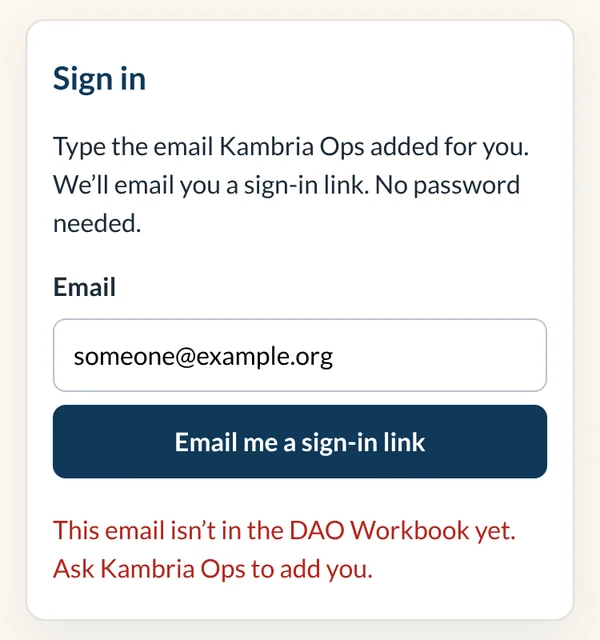
- This email isn’t in the DAO Workbook yet. Ask Kambria Ops to add you. This has two common causes:
- Kambria Ops have not added this email. Check you typed the same email they added, or ask them to add you.
- You were invited but have not opened the invitation link yet. Find the invitation email and open its link first. An invitation link stops working after about a day. If it is too late, ask Kambria Ops to send the invitation again.
- You seem to be offline. Check your connection and try again.
- Please wait … seconds before asking for another link. You asked for a link a moment ago. Wait, then try again. Check your email first: the link may already be there.
- Too many sign-in emails were asked for. Please wait a few minutes and try again.
- We couldn’t check that you’re a person. Please try again. Before sending a link, the page checks that a real person is asking. Sometimes you need to tap a box. If the message keeps coming back, send Kambria Ops a screenshot: the code at the end of the message tells them what went wrong.
- Something went wrong. Please try again.
- This preview isn’t connected to a database yet, so you can’t sign in here. You are on a test copy of the app. Use daowb.kambria.io.
After you sign in
- You’re signed in, but this email isn’t linked to a person yet. Ask Kambria Ops to add you to the Roster. Your sign-in works, but you have no person ID yet. Ask Kambria Ops.
- You aren’t in a DAO yet. Ask your DAO Lead or Kambria Ops to add you. Only Kambria Ops add people to a DAO's Roster.
- We couldn’t load your details. Please refresh the page.
Other problems
- No email arrives: Wait a minute and look in your spam or junk folder. Check the email address shown in the message. Then ask for a new link.
- The link opens the app, but you are not signed in: The link may be old or already used. Go back to the home page and ask for a new link. If it happens again, tell Kambria Ops.
- You asked on a computer but read email on your phone: That is fine. The link also works when you open it in another browser or on another device.
- You want to sign out: Open ☰ and tap Sign out. Do this on a shared computer.