
Kambria Ops
Record the seed fund
Updated 24 Nov 2026
This guide helps Kambria Ops record a DAO's seed fund, entry by entry, so everyone sees when it changed and why.
Steps
- Open the DAO's Paid tasks & budget page (☰ → Kambria Ops → Paid tasks & budget).
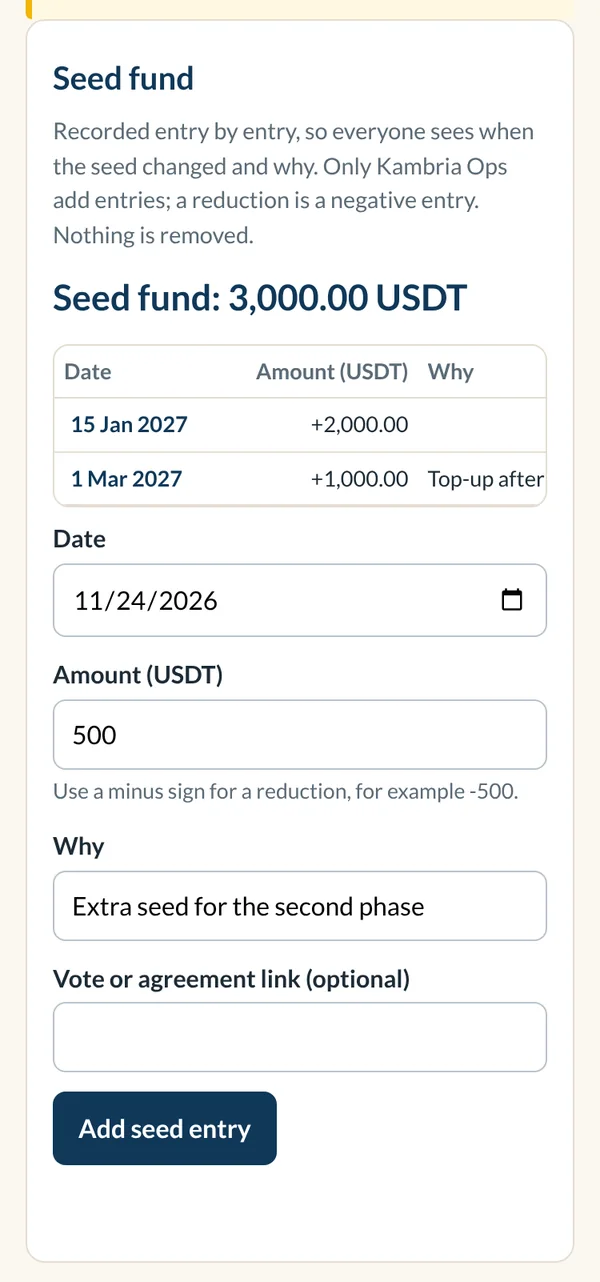
- Go to Seed fund. At the top you see the total, for example Seed fund: 3,000.00 USDT, and the entries so far.
- Choose the Date of the entry. It starts as today.
- Type the Amount (USDT). For a reduction, use a minus sign, for example -500.
- Type Why: the reason for this entry, for example the approved seed or a correction.
- If there is a vote or written agreement, paste its link in Vote or agreement link (optional).
- Tap Add seed entry. The entry shows in the list (an increase with a + sign) and the total changes.
Good to know
- Only Kambria Ops add seed entries. Everyone in the DAO can see them.
- The seed fund is the sum of all entries. The Seed fund on DAO settings shows the same number and can't be typed there.
- Entries are never changed or removed. If an entry is wrong, add a new entry that corrects it, with a reason in Why.
- A new DAO starts at 0.
- The app keeps who added each entry.
- When you import a Workbook into a DAO with no seed entries yet, the seed in the file's Config tab becomes the first entry, with the reason Seed fund from the imported Workbook (Config). After that, an import never changes the seed. It only adds a note if the file's number is different.
- The DAO Lead plans how the seed is spent on the same page. Part C compares the plan with the seed (Within seed?).
- The seed is a plan figure. Money that actually moves is recorded by the Bookkeeper in the Cashbook.
If something goes wrong
- The seed fund can’t go below 0. A reduction can't be larger than the total.
- Say why. Type a reason in Why.
- Enter an amount (not 0). The amount is empty or 0. Type a number that is not 0.
- Add the link to the vote, starting with https:// The link in Vote or agreement link (optional) is not a web link.
- You can’t change this. You are not signed in as Kambria Ops.
- There is no form under Seed fund: only Kambria Ops see it.