
Members
Submit a deliverable
Updated 24 Nov 2026
This guide helps members record a deliverable in Contributions so it can be reviewed.
Steps
- Open your DAO and the Contributions tab (or ☰ → Everyone in a DAO → Contributions).
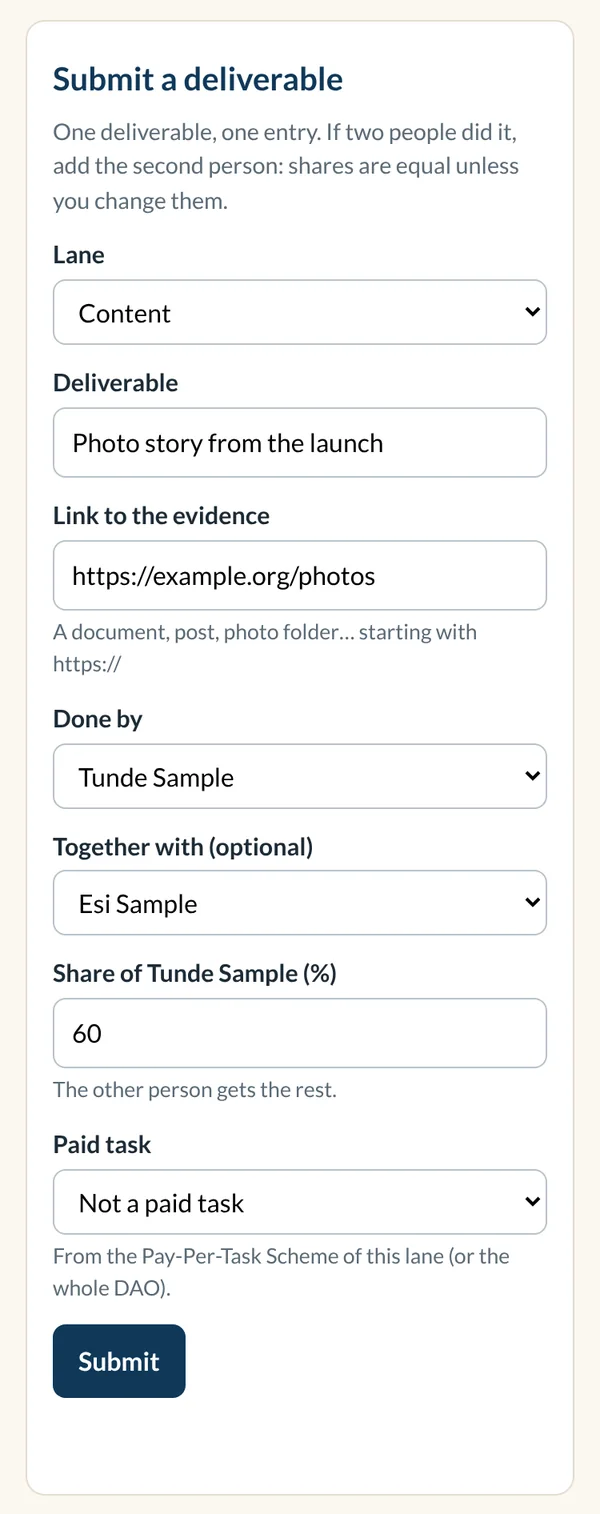
- In Submit a deliverable, choose the Lane.
- Type the Deliverable (what you made) and paste a Link to the evidence: a document, post or photo folder, starting with https://.
- Done by is you. If you did it with someone, choose them in Together with (optional). Shares are 50% each; change Share of …(%) if the split was different. The other person gets the rest.
- Paid task: choose it in Paid task (the tasks of the chosen lane, or of the whole DAO, with their rate). Unpaid work: leave Not a paid task. DAOs that don't pay per task don't see this box, unless they still have paid tasks from before; then the box offers only those, with the note This DAO no longer pays per task: only the paid tasks it already has, paid at their rate.
- Tap Submit. The page says, for example, Submitted as CIRCLES-D-004. and the deliverable shows under Deliverables with In review.
Good to know
- One deliverable, one entry. Two people share one entry; never two entries for the same work.
- At most two people share a deliverable, and shares add up to 100%.
- The evidence link is seen by everyone in your DAO. Link only to what you are happy for them to see.
- Every DAO records contributions, also DAOs that pay nobody per task. Unpaid work still counts.
- After you submit, the lane owner, the DAO Lead and the Facilitator review it in that order. See "Follow your deliverable through review".
If something goes wrong
- Add a link to the evidence, starting with https://
- Shares are above 0% and add up to 100%.
- Choose a paid task of this lane from the Pay-Per-Task Scheme. The paid task belongs to another lane.
- Only active members of this DAO submit deliverables. Ask your DAO Lead to check your status in the Roster.