
Members
Votes and Proposal QA results
Updated 24 Nov 2026
This guide helps members read the DAO's XDAO votes and the closed Proposal QA reviews of the DAO's report.
Steps
Votes:
- Open your DAO and the Voting tab (or ☰ → Everyone in a DAO → Voting).
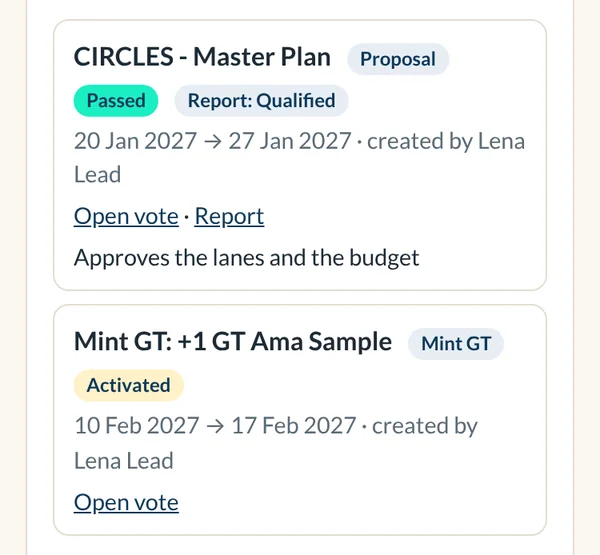
- Votes lists every XDAO vote the DAO created, latest first.
- Each vote shows its title, its type (Proposal, Payment, Mint GT or Burn GT) and its status (Created, Activated, Passed or Closed).
- Below are the start and end dates, who created it and the corresponding proposal. Report: Yes, Report: No or Report: Pending says if the report qualified.
- Tap Open vote to open the vote on XDAO. Payment tx and Report open the payment and the report, when there are any.
Proposal QA:
- Open the Proposal QA tab (or ☰ → Everyone in a DAO → Proposal QA).
- Reviews lists the closed reviews, each with its total out of 90 and its suggested tier, for example "72 / 90 · Good".
- Tap Open to see a review: the score of each item with notes, C. Final qualification score and D. Final decision.
Good to know
- You vote on XDAO, not in this app. The app only records the votes. The DAO Lead records them; members can read them.
- Votes are never deleted. A change is made by changing the status or adding a note.
- Paid tasks are settled through the KDF and are not recorded as votes here.
- The Facilitator scores the DAO's proposal report with the DEP checklist: A. Qualitative evaluation (max 30) plus B. Quantitative evaluation (max 60), 90 in total.
- Reviews are seen by the DAO once the Facilitator closes them. Drafts are seen only by the Facilitator and Kambria Ops.
- The suggested tier: Excellent from 80, Good from 65, Satisfactory from 50, Needs Improvement below 50. KAT / reward suggestion shows what it means for the reward.
- The final decision is Qualified, Qualified with minor revisions or Not yet qualified. It says whether the report is ready for XDAO.
- A closed review can't be changed.
If something goes wrong
- No reviews you can see yet. No review is closed yet.
- Nothing here yet. No votes are recorded yet.
- A vote is missing or its status is out of date: tell your DAO Lead.