
Members
Follow the Workplan and update your tasks
Updated 24 Nov 2026
This guide helps members read the DAO's Workplan, as a list or a timeline, and change the status of the tasks they are doing.
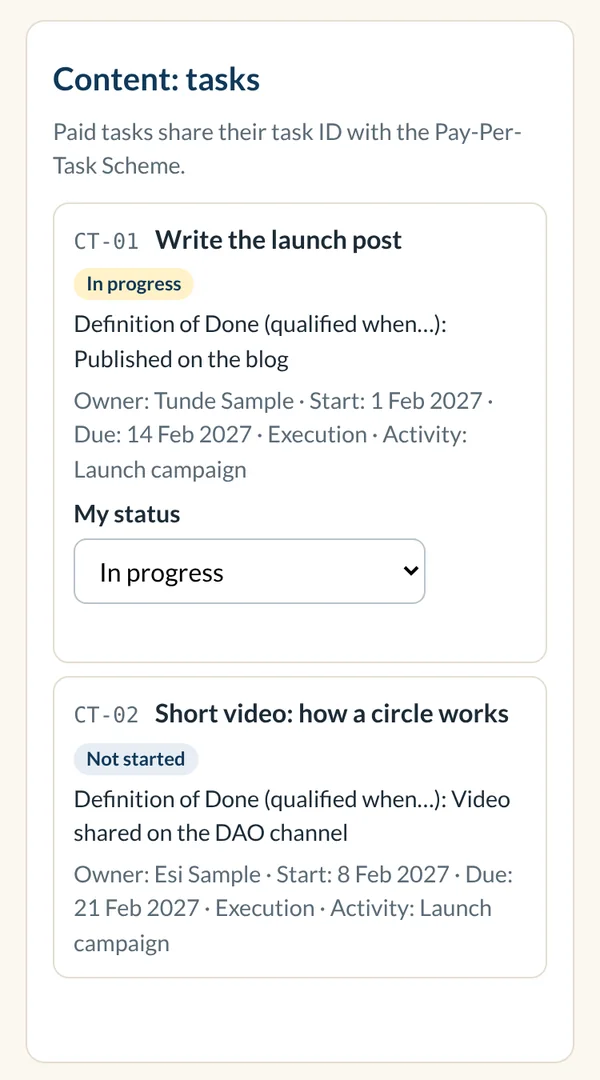
Steps
- Open your DAO and the Workplan tab (or ☰ → Everyone in a DAO → Workplan).
- List is shown first. Each lane has its own part, for example "Outreach: tasks".
- Each task shows its task ID (if it has one), its name and its status: Not started, In progress, Done or Blocked. Below are the Definition of Done (qualified when…), the Owner, the Start and Due dates, the phase and the Activity.
- Find a task where you are the Owner. It has a My status box.
- Choose the new status in My status. It saves straight away and the page says Saved.
- Tap Timeline to see the plan by week. Each bar runs from a task's start date to its due date, grouped by lane. The column of the current week is marked. Tasks with no dates are listed under Tasks without dates.
- Tap List to go back.
Good to know
- The person doing a task (its Owner) can change only its status. The lane's owners add and edit the lane's tasks; the DAO Lead and Kambria Ops can change everything.
- If you own the lane yourself, you change the status with Edit on the task instead of My status. See the Lane owners part.
- The Workplan is the plan. Whether a deliverable met its Definition of Done is checked in Contributions. Changing a task to Done does not submit anything; see "Submit a deliverable".
- Paid tasks share their task ID with the Pay-Per-Task Scheme.
- Activities at the bottom of the list bundle several lanes toward one shared goal, such as a launch campaign.
- The timeline shows at most 26 weeks. On a phone, swipe it sideways.
- The OKR tab shows the DAO Objective on three axes (Reach, Depth, Self-propagation) and each lane's Key Results with % to target. Members can read it but not change it.
If something goes wrong
- You can change only the status of a task you are doing.
- Add lanes first (Lanes & roles), then each lane adds its tasks. The DAO has no lanes yet; ask your DAO Lead.
- Couldn’t save. Check the fields and try again.
- We couldn’t load this DAO. Please refresh the page.
- A task you are doing has no My status box: you are not its Owner. Ask the lane's owners to set you as the owner.