
Bookkeeper
Set up the holders
Updated 24 Nov 2026
This guide helps the Bookkeeper keep the list of holders: the people and places that hold the DAO's money.
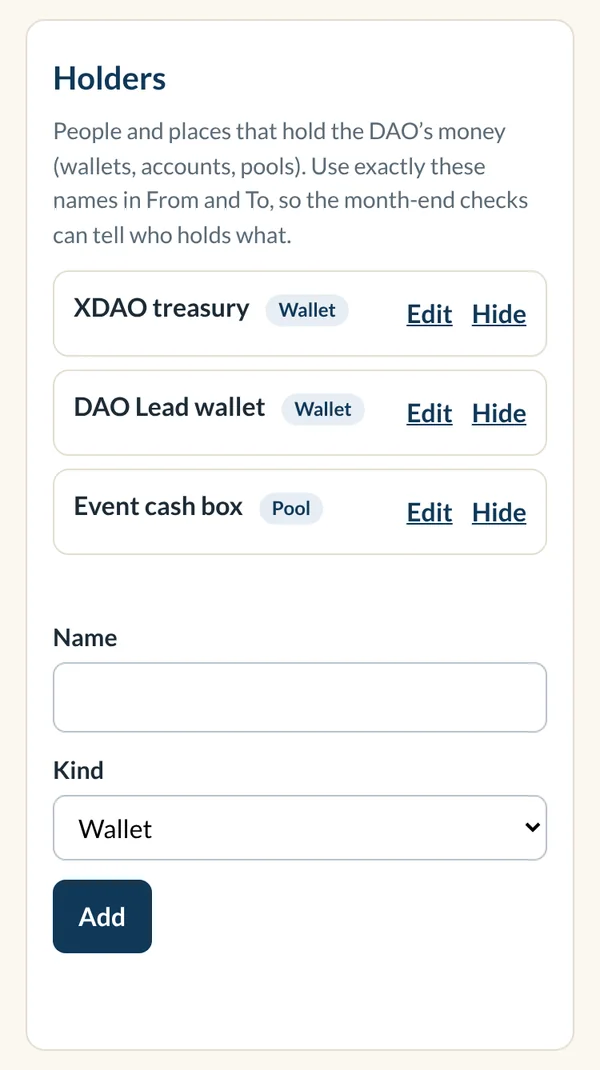
Steps
- Open your DAO and the Cashbook tab (or ☰ → Bookkeeper → Cashbook).
- Make sure Lines is chosen at the top. Scroll down past the lines to Holders.
- Type the Name of the holder, for example the XDAO treasury, a pool or a person's wallet.
- Choose the Kind: Wallet, Account, Pool, Person or Other.
- Tap Add. The page says Saved. and the holder shows in the list.
- To change a holder, tap Edit, change the fields and tap Save changes (or Cancel).
- To take a holder off the list, tap Hide and confirm. It stays in the change history.
Good to know
- Set up the holders before you record lines. In each line, use exactly these names in From (payer) and To (payee / holder).
- When you type in From (payer) or To (payee / holder), the app suggests the holders and the active members. You can also type an outside name.
- At month-end, block B of the Month-end view has one row per holder. It adds up what each holder received (lines where it is in To) and sent out (lines where it is in From). A line with a different spelling is not counted for that holder.
- If you rename a holder, older lines keep the old name. Their amounts then no longer count for that holder.
- A hidden holder no longer shows in block B.
- Only the Bookkeeper adds and changes holders. Everyone in the DAO can read the list.
If something goes wrong
- Name: Required. Type a name first.
- This holder is already on the list. Each name is used once. Upper and lower case count as the same name.
- You can’t change this. Only the Bookkeeper of this DAO changes the list. Ask your DAO Lead to check your role in Lanes & roles.