
Lane owners
Key Results for your lane
Updated 24 Nov 2026
This guide helps lane owners set and update the Key Results of their lane.
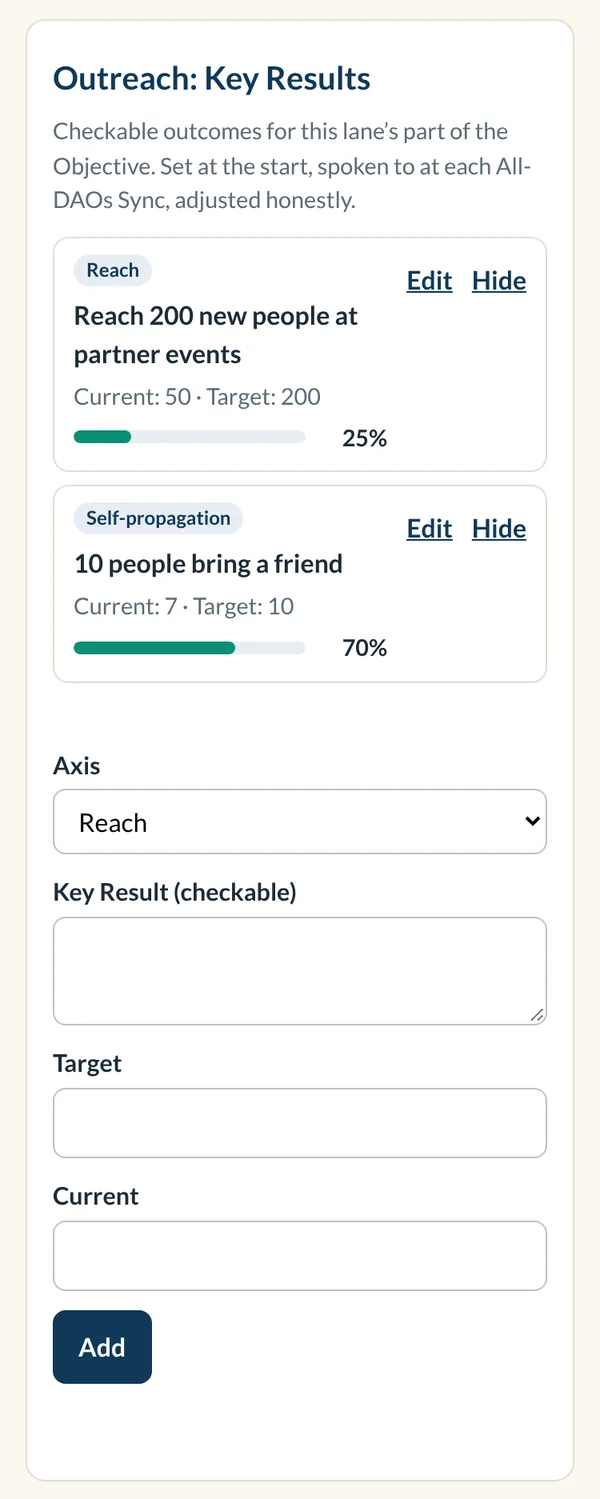
Steps
- Open your DAO and the OKR tab (or ☰ → Lane owners → OKR).
- Scroll past the DAO Objective to the card with your lane's name and Key Results.
- To add a Key Result, fill in the form at the bottom of that card:
- Axis: Reach, Depth or Self-propagation. Choose the part of the Objective this result helps.
- Key Result (checkable): one outcome that anyone can check, for example "40 people attend the launch event".
- Target: the number you aim for.
- Current: where you are now. Leave it empty at the start if you have no number yet.
- Tap Add. The page says Saved. and the Key Result shows in the list with a progress bar.
- To update a number later, tap Edit under the Key Result, change Current (or another field) and tap Save changes.
- To remove a Key Result you no longer use, tap Hide and confirm.
Good to know
- The DAO Objective has three axes: Reach (new people or communities), Depth (people who return) and Self-propagation (people who bring others in). Each Key Result belongs to one axis.
- The percentage next to the bar is current divided by target, as in the spreadsheet. With no target or no current number, it shows "—".
- Set Key Results at the start, speak to them at each All-DAOs Sync and adjust them honestly.
- You can change only your own lane's Key Results. The DAO Lead and Kambria Ops can change all of them, and only they change the DAO Objective.
- Hide does not delete. The Key Result stays in the change history.
- Everyone in the DAO can read the OKR page.
If something goes wrong
- Key Result (checkable): Required. Write the Key Result before you save.
- Numbers are 0 or more. Target and Current can't be negative.
- You can’t change this. This card belongs to another lane.
- Couldn’t save. Check the fields and try again. Check your connection and try again.
- The page says Add lanes first (Lanes & roles), then each lane sets its Key Results. The DAO has no lanes yet. Ask your DAO Lead.