
DAO Lead
The DAO Objective and activities
Updated 24 Nov 2026
This guide helps the DAO Lead set the DAO Objective on its three axes and keep the activities that join lanes.
Steps
- Open your DAO and the OKR tab (or ☰ → DAO Lead → OKR).
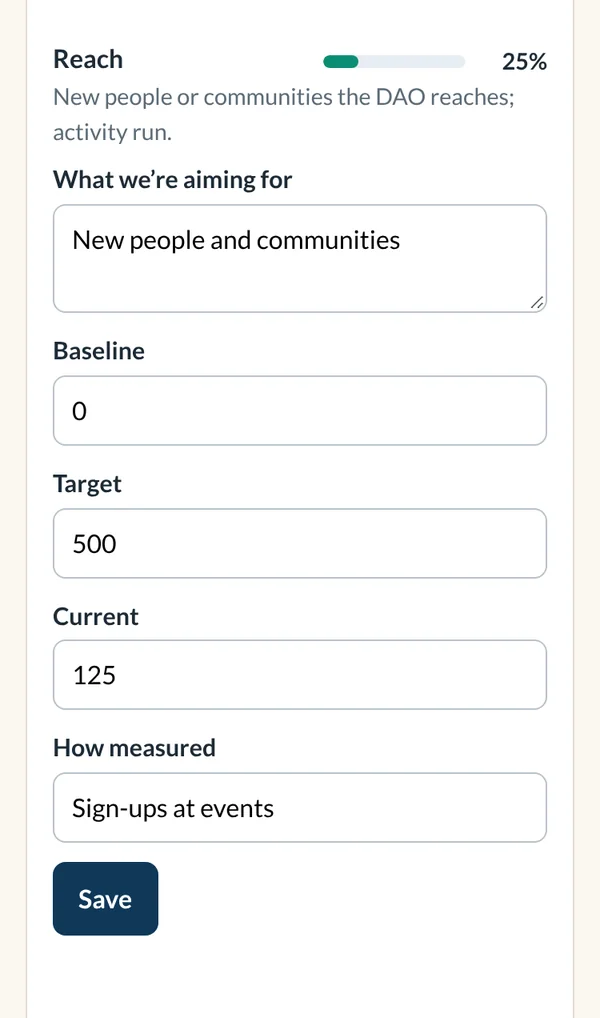
- In DAO Objective, find the axis: Reach, Depth or Self-propagation.
- Fill in What we’re aiming for, Baseline, Target, Current and How measured.
- Tap Save under that axis. The page says Saved. and the bar shows the new % to target.
- Do the same for the other two axes. Update Current as the DAO makes progress.
- For activities, open the Workplan tab (or ☰ → DAO Lead → Workplan) and go to Activities at the bottom.
- Type the Activity and its Shared goal, then tap Add. To change one, tap Edit, then Save changes.
Good to know
- The DAO has one Objective on three impact axes. Revenue is recorded but is not the target.
- % to target is Current divided by Target. With no target, it shows —.
- Each lane's owners keep its Key Results. You can also add and edit Key Results for any lane.
- An activity bundles several lanes toward one shared goal, for example the launch campaign. Lane owners link a task to it with the task's Activity field.
- You can add and edit the tasks of every lane in the Workplan.
If something goes wrong
- Numbers are 0 or more.
- Activity: Required. Name the activity.
- You can’t change this. You are not the DAO Lead of this DAO.