
Members
Your Credits, Karma and KAT
Updated 24 Nov 2026
This guide helps members see their own Credits, Karma level and KAT for each month, and their tier.
Steps
- Open your DAO and the KAT tab (or ☰ → Everyone in a DAO → KAT).
- Choose the month in Period. The newest month is shown first.
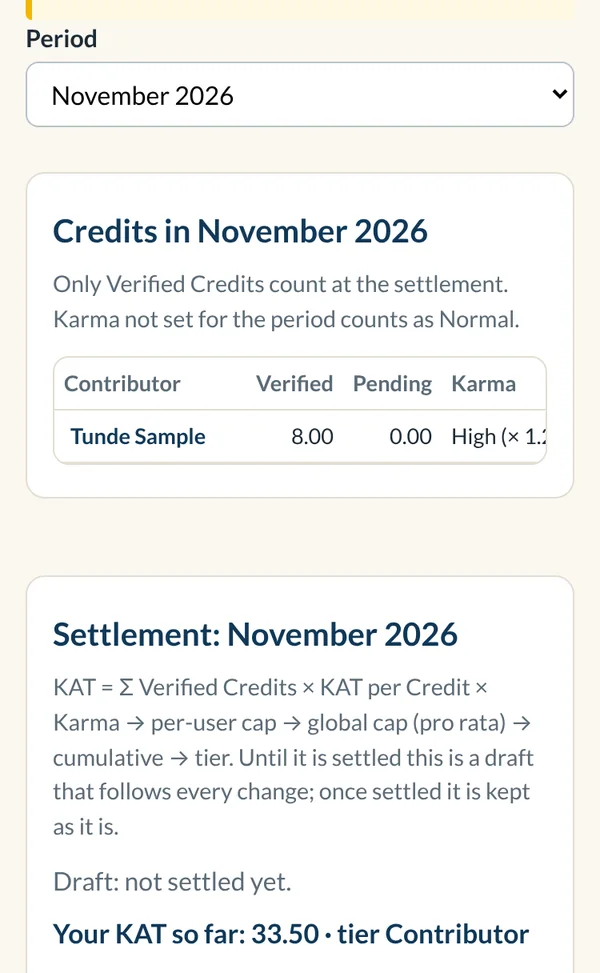
- Credits in (the month) shows your Verified and Pending Credits and your Karma, for example Normal (× 1).
- Credits Log lists your entries for the month: number, credits, status (Pending, Verified or Rejected), date, rule, who verified it and the evidence link.
- Karma Register shows your Karma level for the month, if the Organizer set one, with who set it and when.
- Settlement: (the month) shows your line: Σ Credits, Karma ×, Raw KAT, After cap, Final KAT, Cumulative and Tier. It says Draft: not settled yet. or Settled with the date and name.
- Above your line you see Your KAT so far: with your KAT and your tier.
Good to know
- You see only your own Credits, Karma and KAT. The DAO Lead, the Facilitator, the Bookkeeper, the Organizer and Kambria Ops see everyone's.
- The DAO's Organizer logs Credits and sets Karma. Nobody verifies their own Credits or sets their own Karma.
- KAT is symbolic, non-financial and non-tradable. It is a number, not money or a token.
- Only Verified Credits count. Karma not set for a month counts as Normal.
- KAT = Verified Credits × KAT per Credit × Karma, then a per-person cap and a cap for the whole DAO. The numbers for your DAO are under KAT Config.
- Karma levels: Low (× 0), Normal (× 1), High (× 1.2), Trusted (× 1.5). Trusted needs High or Trusted in the two months before.
- Until a month is settled, its numbers are a draft that follows every change. Once settled, they are kept as they are.
- Your KAT so far adds up your Final KAT of the settled months only.
- Tiers come from your total KAT: Seeker (0–19), Contributor (20–59), Builder (60–149), Steward (150 and more). These are the shared defaults; Tiers & privileges at the bottom of the page shows the exact numbers and what each tier gives.
- Credit Rules at the bottom of the page lists what earns Credits.
- Exception log shows corrections, violations and disputes about you, if any.
If something goes wrong
- Nothing here yet. No Credits or Karma for you in this month.
- No Verified Credits in this period.
- An entry is missing or wrong: tell your DAO's Organizer. Verified or rejected entries are locked. Before the month is settled, the Organizer adds a correction, shown as Corrects # and the entry's number. After that, corrections are recorded in the Exception log.
- A settled month does not change any more. Raise a problem with the Organizer or the Facilitator before the month is settled.