
DAO Lead
DAO settings
Updated 24 Nov 2026
This guide helps the DAO Lead keep the DAO's settings correct: its identity, on-chain details, file library, partners and events.
Steps
- Open your DAO and the Settings tab (or ☰ → DAO Lead → DAO settings).
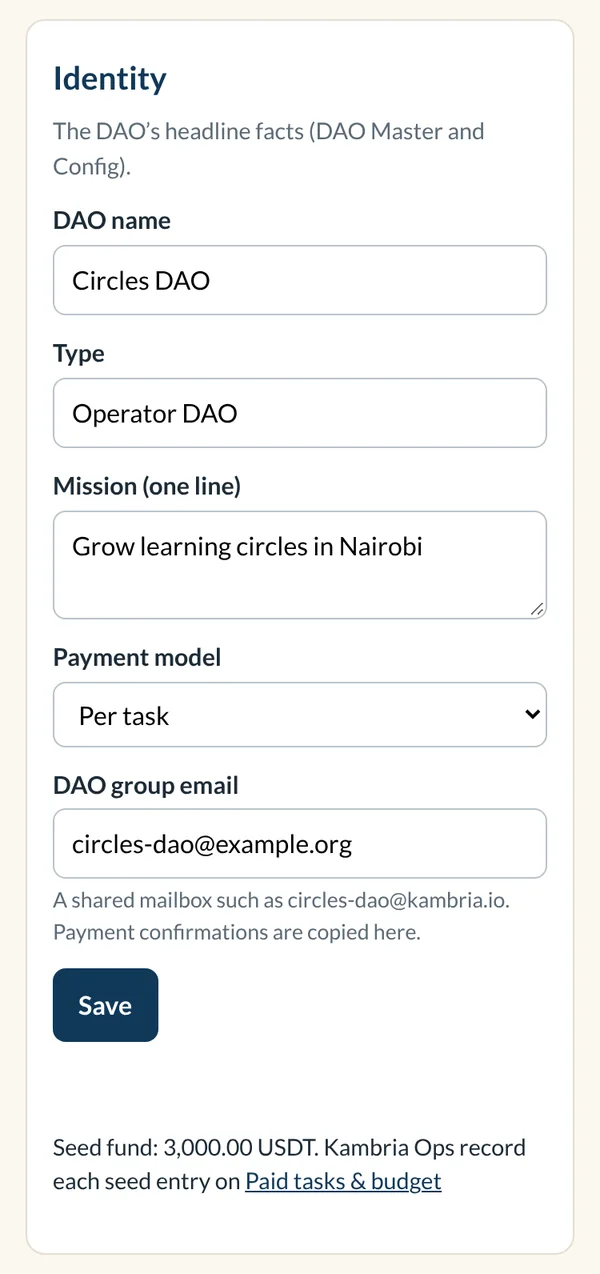
- In Identity, fill in DAO name, Type, Mission (one line), Payment model and DAO group email. Tap Save. The card says Saved.
- In KDF on-chain, copy the details from the deployed contracts: Chain, Chain ID, XDAO treasury (GT) address, GT symbol, LP symbol, the three contract addresses and Accepted token. Tap Save.
- In File library, add the DAO's live documents. Type the Document name and its Link (https://…), add a Note if useful, then tap Add.
- In Nodes and community partners (optional), add each partner with Node or partner, Representative, Location and Contact or link. Tap Add.
- In Event catalog, add your DAO's own events: Event ID, Event, Date, Phase, Points and Counts toward score. Tap Add.
- To change a row in a list, tap Edit, change it and tap Save changes. To remove it from view, tap Hide.
Good to know
- Payment model decides how contributors are paid: Per task, Pool or None (nobody is paid per task). Only DAOs that pay Per task add paid tasks to a Pay-Per-Task Scheme. Changing the model applies to new tasks only: paid tasks the DAO already has stay, read-only, and are still paid at their rate.
- The DAO group email is a shared mailbox. Confirmation emails for Verified deliverables and payment confirmations are copied there.
- Scoring rules (the Low band, Mid band and Phase cleared values) are read-only for you. The card says Set by Kambria Ops.
- The seed fund is shown under Identity. Kambria Ops record each seed entry on Paid tasks & budget; you cannot change it here.
- Events tagged Cohort are shared by every DAO in the cohort, and only Kambria Ops change them. You can edit and hide only events tagged This DAO.
- Nothing is deleted. A hidden row stays in the change history.
If something goes wrong
- DAO name: Required. The DAO name can't be empty.
- That doesn’t look like an email address. Check the DAO group email.
- An address starts with 0x and has 40 more letters or numbers. Copy the full address again.
- A link starts with https://
- Use letters, numbers and dashes, for example D3-KO. This is about the Event ID.
- You can’t change this. You are not the DAO Lead of this DAO, or the item belongs to Kambria Ops.
- Couldn’t save. Check the fields and try again.