
Kambria Ops
The Hub and the logs
Updated 24 Nov 2026
This guide helps Kambria Ops see every DAO at a glance on the Hub and download the 5 logs for all DAOs.
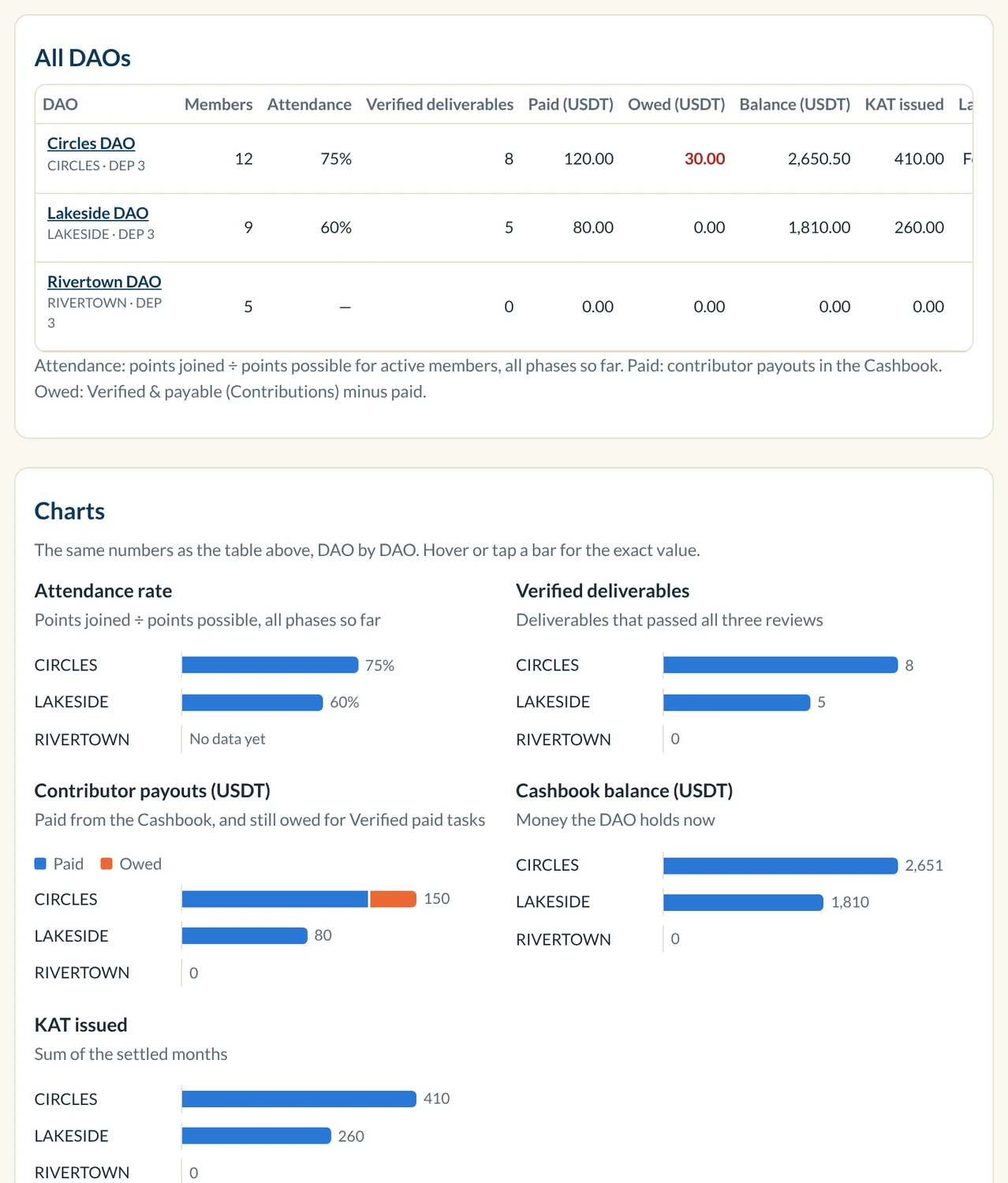
Steps
Read the summary
- On the home page, tap Hub: every DAO at a glance (or ☰ → Kambria Ops → Hub).
- Read All DAOs: one row per DAO, with these columns:
- Members: active members.
- Attendance: points joined ÷ points possible for active members, all phases so far.
- Verified deliverables: deliverables that passed all three reviews.
- Paid (USDT): contributor payouts in the Cashbook.
- Owed (USDT): Verified and payable in Contributions, minus what was paid.
- Balance (USDT): the Cashbook balance now.
- KAT issued: the sum of the settled months.
- Last month closed: the last month the Facilitator closed, with (locked) if it is locked.
- Tap a DAO's name to open its DAO settings.
- Under Charts, compare the DAOs: Attendance rate, Verified deliverables, Contributor payouts (USDT) (paid and owed), Cashbook balance (USDT) and KAT issued. Hover over or tap a bar for the exact value.
Download the 5 logs
- Go to Download the 5 logs.
- Tap Download logs (.xlsx). The page says Preparing the file…
- Your browser saves one .xlsx file with five tabs: events_log, contributions_log, cash_log, weekly_log and kat_log.
Good to know
- Kambria Ops and the Facilitators of every DAO can open the Hub. They see all DAOs, not only their own.
- The numbers come straight from each DAO's pages. Nothing is typed on the Hub.
- — in a cell means there is no number yet.
- The 5 logs cover every DAO. They are joined by person_id, task_id and deliverable_id, so you can combine them in a spreadsheet.
- The logs contain no emails. They use person IDs, and the names typed in each Cashbook.
- Shared catalogs at the bottom says where each shared list is kept. See "Shared catalogs".
If something goes wrong
- The Hub is for Kambria Ops and Facilitators. You are not signed in as Kambria Ops or as a Facilitator.
- No DAOs yet. Add a DAO first. See "Add a DAO and its members".
- The file couldn’t be made. Please try again.
- We couldn’t load this DAO. Please refresh the page. The Hub could not load. Refresh the page.
- The Hub link is missing on the home page: you are not Kambria Ops or a Facilitator, or the page is still loading.