
Facilitator
Score the proposal report
Updated 24 Nov 2026
This guide helps the Facilitator score the DAO's proposal report with the DEP checklist and close the review.
Steps
- Open your DAO and the Proposal QA tab (or ☰ → Facilitator → Proposal QA).
- In Start a review, type the Review name, for example "DEP 3 · Final report". Paste the Link to the report.
- Tap Start review. The review opens below Reviews, as a Draft.
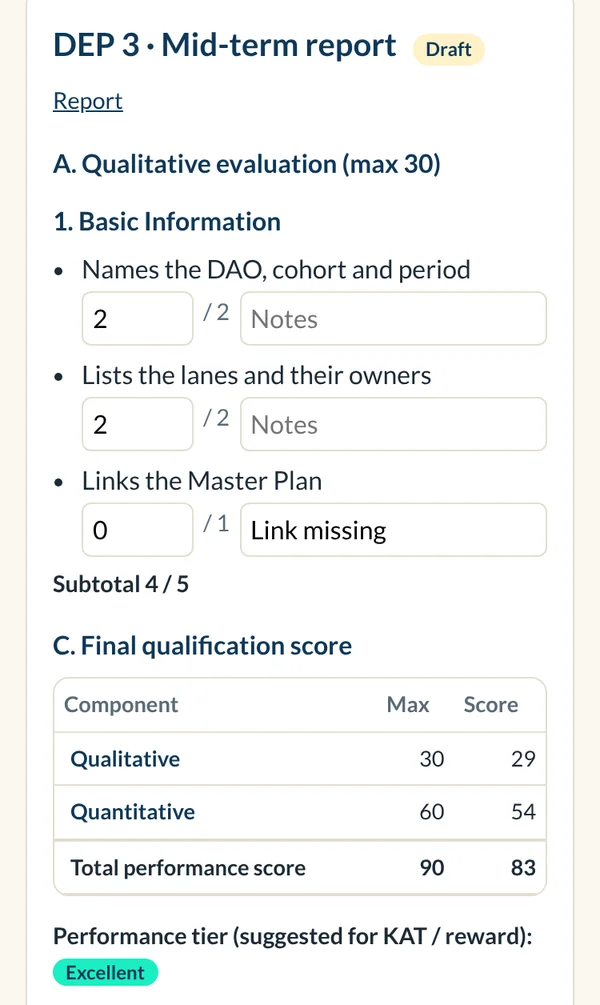
- Open the report. For each item, type the score in the box next to it. The box shows the item's maximum, for example / 2. Add a note in Notes if useful.
- Watch the totals as you type: each group's subtotal, then C. Final qualification score with Qualitative, Quantitative and Total performance score, the Performance tier (suggested for KAT / reward) and the KAT / reward suggestion.
- Tap Save draft to keep your work and come back later. To come back, tap Open next to the review in Reviews.
- When every item is scored, choose D. Final decision: Qualified, Qualified with minor revisions or Not yet qualified. Add Notes if needed.
- Tap Close the review and confirm. The review becomes Final and the DAO can see it.
Good to know
- The checklist has 28 items in two parts:
- A. Qualitative evaluation (max 30): 21 items in 6 groups (Basic Information, Execution Summary, Budget Report, Outcomes & Evidence, Reflections & Learning, Overall Alignment & Report Quality).
- B. Quantitative evaluation (max 60): 7 items in 2 groups (Goal Achievement Score, Team Engagement Score).
- The total is out of 90. Scores can use halves, for example 1.5.
- The suggested tier comes from the total:
- 80 or more: Excellent, about 120%.
- 65 or more: Good, about 100%.
- 50 or more: Satisfactory, about 80%.
- Below 50: Needs Improvement, partial only.
- The tier is a suggestion for KAT and reward. The final decision says whether the report is ready for XDAO.
- A draft is seen only by you and Kambria Ops. The DAO sees the review once you close it, with the scores, notes and decision.
- A closed review can't be changed. To score a new report, start a new review with another name.
- Only the DAO's Facilitator scores. The checklist is the same for every DAO and can't be changed in the app.
If something goes wrong
- Name the review.
- A review with this name already exists.
- Add a link to the evidence, starting with https:// The report link is not a web address.
- A score is above the item’s maximum.
- Score every item before closing the review.
- Choose the final decision before closing the review.
- This review is closed and can’t be changed.
- Only the DAO’s Facilitator scores the proposal report.