
Facilitator
Review step 3 and stand-in reviewers
Updated 24 Nov 2026
This guide helps the Facilitator give the third and last review of a deliverable, and name a stand-in reviewer for step 1 or 2.
Steps
Review step 3:
- Open your DAO and the Contributions tab (or ☰ → Facilitator → Contributions).
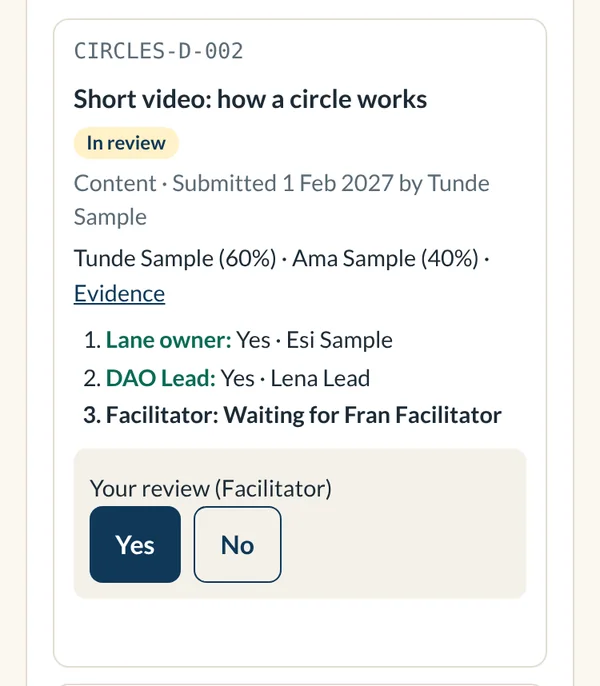
- In Show, choose In review or to fix. A deliverable waiting for you shows Facilitator: "Waiting for" and your name.
- Open the Evidence link and check the work against the task's Definition of Done.
- In Your review (Facilitator), tap Yes if it is done. The deliverable becomes Verified and the app sends the confirmation email. See "The confirmation email".
- If something must change, tap No, write it in What needs to change? and tap Send No. The deliverable shows Changes requested.
Name a stand-in reviewer:
- Find the deliverable. When nobody can review the next step, it shows Nobody can review this step yet: the Facilitator names a stand-in.
- Tap Name a stand-in for the Lane owner step (or Name a stand-in for the DAO Lead step).
- Choose the Stand-in reviewer. Type the reason in Why (shown to everyone).
- Tap Name stand-in. The step shows Stand-in: with the name and the reason.
Good to know
- The order is always: lane owner, then DAO Lead, then Facilitator. Your step opens only after the first two said Yes.
- Three Yes make the deliverable Verified. A Verified deliverable is locked: nobody can change or withdraw it.
- Nobody reviews work they have a share in or submitted, and one person does not review two steps of the same round.
- After a No, the member fixes the deliverable and sends it again. The review starts again from step 1, and the earlier No stays visible with its round.
- If one lane owner has a share, the other owner reviews step 1. You need a stand-in only when nobody is left: for example both owners, or the DAO Lead, have a share.
- You can name a stand-in for step 1 or step 2 only. When you can't review step 3 (you have a share in it, or you gave a Yes at an earlier step as a stand-in), the step says Nobody can review this step yet: Kambria Ops name a stand-in (a Facilitator of another DAO). Kambria Ops then name a Facilitator of another DAO, with a reason.
- Once a stand-in is named for a step, only the stand-in reviews that step. Naming another person replaces the first.
- The list of stand-ins offers active members and role holders of the DAO, minus anyone with a share, the person who submitted it and anyone who already said Yes in another step.
If something goes wrong
- Say what needs to change.
- You can’t review this step of this deliverable. You have a share in it, submitted it, or reviewed another step of it.
- Someone reviewed it a moment ago. The list has been refreshed.
- Say why a stand-in reviews this step.
- The stand-in can’t have a share, have submitted it or review another step of it.
- Only the DAO’s Facilitator names a stand-in.
- A Verified deliverable can’t be changed.