
Facilitator
Mark attendance
Updated 24 Nov 2026
This guide helps the Facilitator mark which events were held and who joined them.
Steps
- Open your DAO and the Attendance tab (or ☰ → Facilitator → Attendance). The note says you are this DAO's Facilitator.
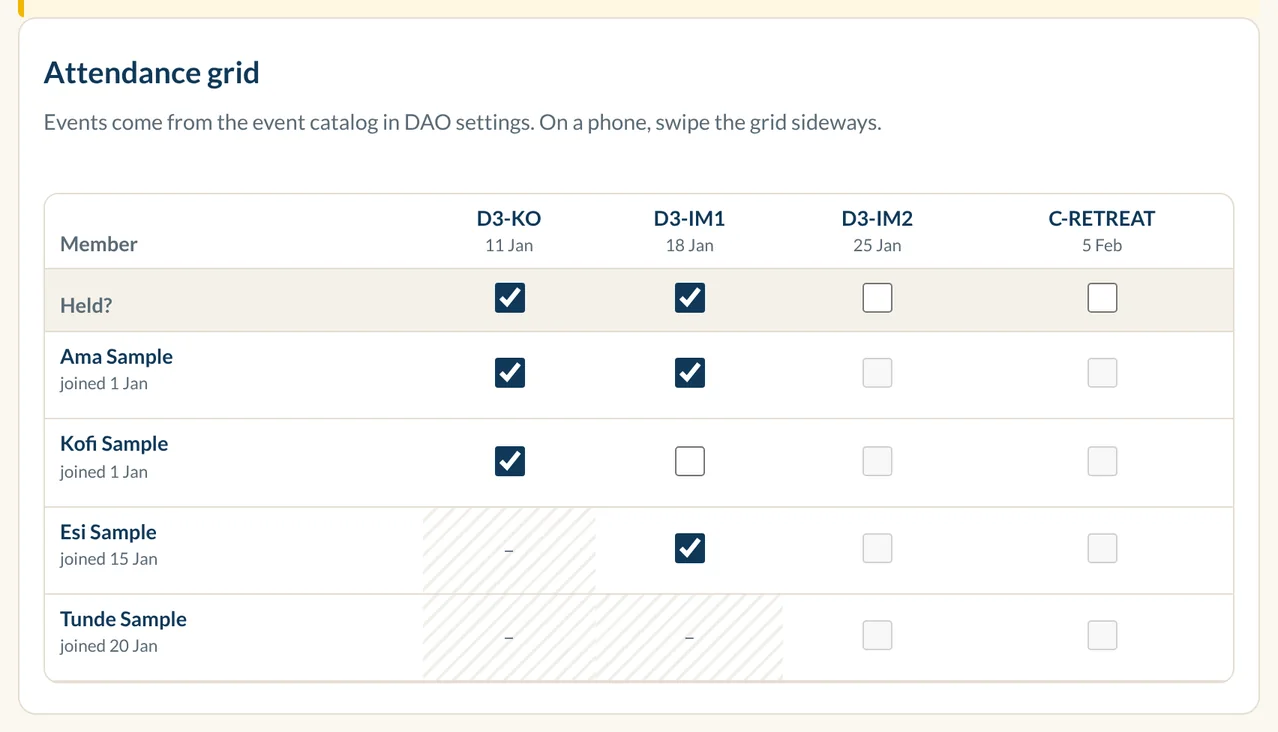
- In the Attendance grid, find the event. Each column shows the event ID and its date. On a phone, swipe the grid sideways.
- Once the event has taken place, tick its box in the Held? row. The page says Saved.
- In the same column, tick each member who joined. Each tick saves straight away.
- To undo a mark, untick the box.
- Check Scores below the grid. They update after each tick.
Good to know
- Events come from the event catalog in DAO settings. Cohort events are shared by every DAO in the cohort; the DAO can add its own.
- A member's box stays greyed out until you tick Held? for that event.
- A cell with "–" is an event before that member joined the DAO. It can't be ticked, so joining late does not lower anyone's score.
- An event marked not scored does not count toward the score.
- Scores are shown per phase. Score shows the points of the held events a member joined, out of the points of the held events since they joined (for example 3/4). % of max, Band (Low, Mid or High) and Cleared (✓) follow from it. The limits come from DAO settings → Scoring rules.
- Only the Facilitator marks attendance. The DAO Lead, Kambria Ops and members can read it.
- Unticking keeps the mark in the records as "not held" or "not joined"; nothing is deleted.
If something goes wrong
- Tick Held? for this event first.
- That event was before this member joined the DAO.
- Only members of the DAO can be marked.
- No events yet. Add them to the event catalog in DAO settings.
- No members yet. Kambria Ops add them on the Roster.
- You can’t change this. Only this DAO's Facilitator marks attendance. Ask Kambria Ops to check your role.