
DAO Lead
Record votes
Updated 24 Nov 2026
This guide helps the DAO Lead record every XDAO vote the DAO creates and keep its status up to date.
Steps
- Open your DAO and the Voting tab (or ☰ → DAO Lead → Voting).
- In Votes, type the Voting title and choose the Voting type: Proposal, Payment, Mint GT or Burn GT.
- Choose the Status: Created, Activated, Passed or Closed.
- Fill in Created, Starts and Ends, and paste the Voting link.
- If they apply, add the Corresponding proposal, Payment tx link, Report link and Report qualified? (Pending, Yes or No). Add Notes if useful.
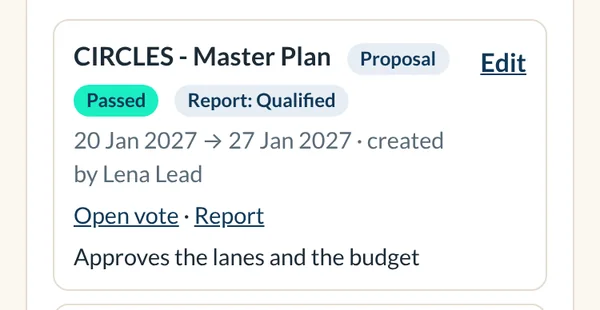
- Tap Add. The vote shows in the list, latest first (by the Created date).
- When the vote moves on, tap Edit, change the Status or add links, and tap Save changes.
Good to know
- Record every XDAO vote: proposals, payments for operating costs and GT changes.
- Paid tasks are settled through the KDF, not recorded here.
- Votes are never deleted. Change the status or add a note instead.
- The app records who created each vote. Everyone in the DAO can read the list.
- The vote link you record for a paid task goes in the Pay-Per-Task Scheme, in Approved by vote (link).
If something goes wrong
- Voting title: Required.
- The vote ends after it starts. Check the Starts and Ends dates.
- Add the link to the vote, starting with https:// The Voting link is not a web link.
- Add a link, starting with https:// The Payment tx link or the Report link is not a web link.
- You can’t change this. Only the DAO Lead records votes.