
Bookkeeper
Record a money movement
Updated 24 Nov 2026
This guide helps the Bookkeeper record each money movement as one line in the Cashbook.
Steps
- Open your DAO and the Cashbook tab (or ☰ → Bookkeeper → Cashbook). Make sure Lines is chosen.
- In Record a money movement, pick the Date the money moved. Today is filled in.
- Type the Description (what + why), for example what was paid and for which task.
- Type the Ref #: the task_id for a contributor payout, or a reference that starts with FUND-, TRF- or EXP-.
- Choose the Lane, or leave DAO-wide.
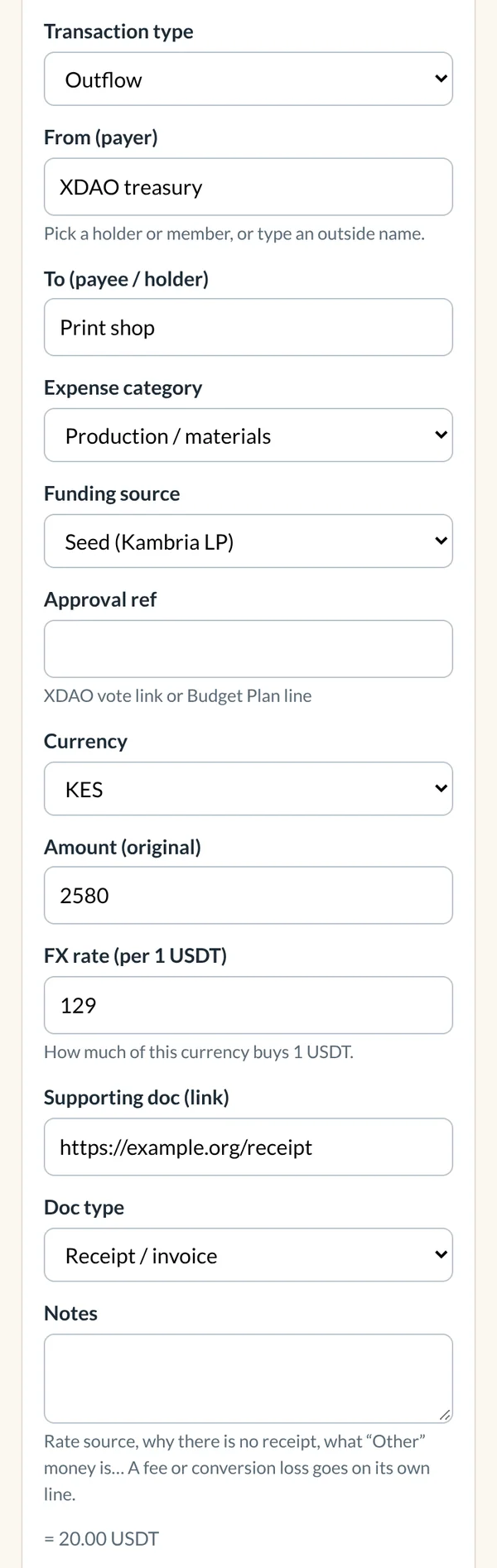
- Choose the Transaction type: Inflow (money comes in), Outflow (money goes out) or Internal transfer (money moves between two holders of the DAO).
- Fill in From (payer) and To (payee / holder). Pick a holder or member from the suggestions, or type an outside name.
- For an Inflow, choose the Income category. For an Outflow, choose the Expense category. Each box shows only for its type.
- Choose the Funding source: Seed (Kambria LP), Restricted sponsorship, Earned revenue or Other. For Other, say in Notes what this money is.
- Type the Approval ref. For an operating cost: the XDAO vote link or the Budget Plan line that approved the spending. For a Contributor payouts outflow: the deliverable_id of the Verified deliverable it pays, for example CIRCLES-D-004. The box then suggests the DAO's Verified deliverables.
- Choose the Currency (USDT is filled in) and type the Amount (original), in that currency.
- If the currency is not USDT, type the FX rate (per 1 USDT): how much of this currency buys 1 USDT. Under the form, the app shows the amount in USDT, for example = 25.00 USDT.
- Paste the Supporting doc (link) and choose the Doc type.
- Add Notes if needed: the rate source, why there is no receipt, or what Other money is.
- Tap Add line. The page says Saved. and the line shows at the top of Lines with its number, for example #12.
Good to know
- One date per line, one movement per line, no lump sums. A fee or a conversion (FX) loss is its own line, not a note on the payment.
- Only Date and Description (what + why) are needed to save. The Auto-check tag on the line then says what is still missing. It shows ✓ when the line is complete.
- The Auto-check looks at the line in this order and shows the first problem it finds:
- Pick a type
- Missing income category
- Missing expense category
- Missing funding source
- Missing From / To
- Missing amount or FX rate
- Missing supporting doc (no link, or the doc type is Missing)
- Explain no-receipt in Notes (the doc type says there is no receipt, but Notes is empty)
- Duplicate Ref # (another line uses the same Ref #; contributor payouts are not checked for this)
- Payout needs task_id in Ref #
- Payout needs deliverable_id in Approval ref (a Contributor payouts outflow with an empty Approval ref)
- Approval ref is not a Verified deliverable (the Approval ref of a payout is not the deliverable_id of a Verified deliverable of this DAO)
- Use the Show box above the lines to find Auto-check not ✓ lines.
- The USDT amount is the original amount for USDT. For other currencies it is the original amount divided by the FX rate.
- Currencies: USDT, USDC, POL, USD, VND, PHP, NGN, KES and Other.
- Doc types: On-chain tx link, Receipt / invoice, Bank / e-wallet screenshot, CC’d group email, Signed agreement, No receipt — reason in Notes and Missing.
- An Inflow adds to the balance and an Outflow takes from it. An Internal transfer changes who holds the money, not the balance.
- Each line shows the balance after it, and who typed it. Current balance at the top is the balance after the last line.
- The top of the Cashbook shows the DAO group email. Copy it (CC) on every payment confirmation.
- Lines are numbered by the app, one after the other. Lines are never deleted. See "Fix a line: edits, queries and correcting lines".
If something goes wrong
- Pick the date.
- Describe what the money was for.
- Add a note saying what this money is (funding source Other). A line with the funding source Other needs Notes.
- Amounts and FX rates are numbers above 0. The amount can't be negative and the FX rate must be above 0.
- Add a link to the evidence, starting with https:// The supporting doc link is not a web address.
- That month is closed and locked. Record a correcting line in an open month. The date falls in a month the Facilitator has locked. Use a date in an open month.
- You can’t change this. Only the Bookkeeper of this DAO records lines. Ask your DAO Lead to check your role in Lanes & roles.
- Couldn’t save. Check the fields and try again.