
Organizer
Log and verify Credits
Updated 24 Nov 2026
This guide helps the Organizer record Credits for members in the Credits Log and verify or reject them.
Steps
- Open your DAO and the KAT tab (or ☰ → Organizer → KAT).
- At the top, choose the Period (month) you want to see. The Credits Log lists that month's entries.
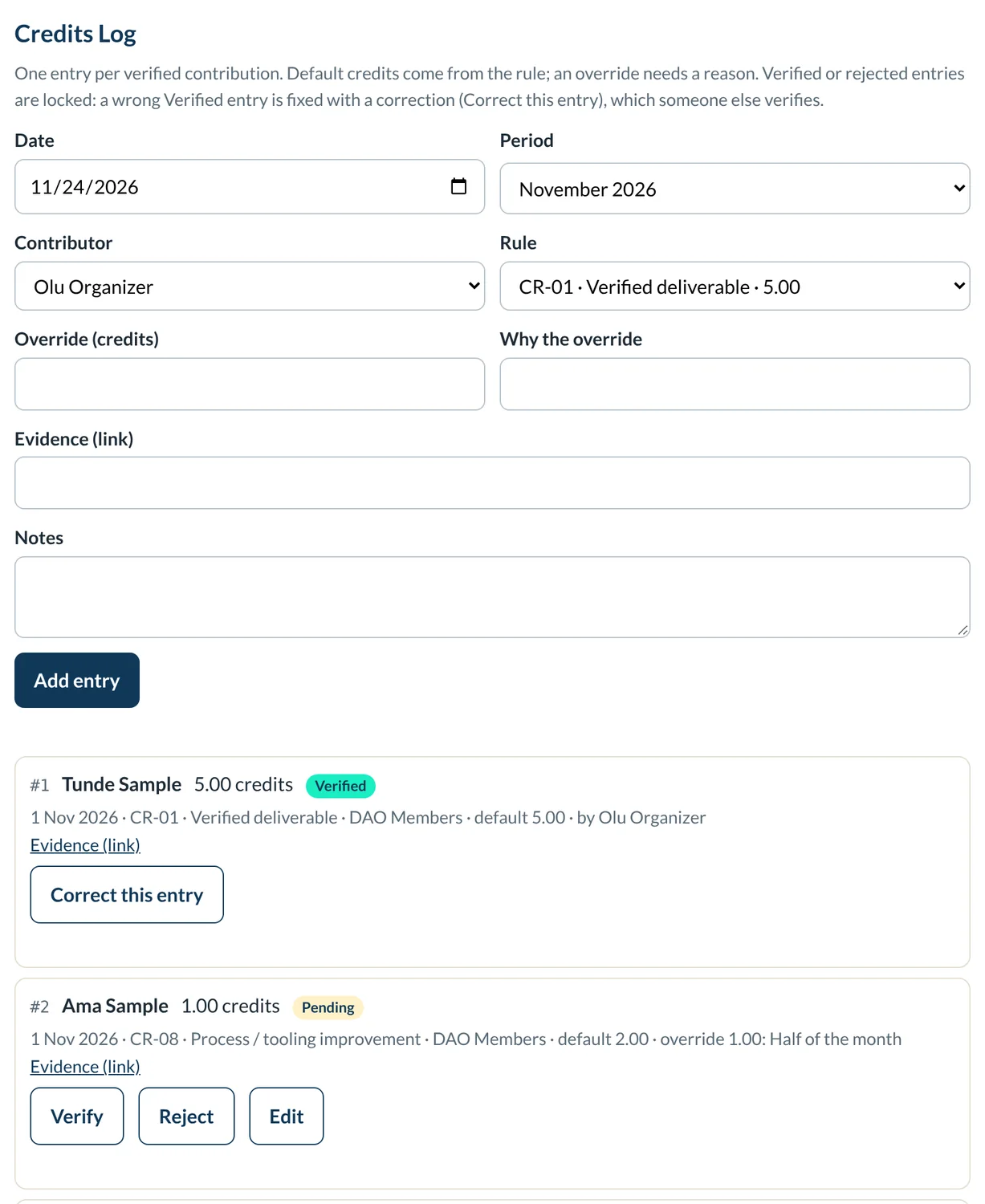
- In the Credits Log form, set the Date of the contribution and the Period it counts for: this month or last month.
- Choose the Contributor and the Rule. Each rule shows its ID, trigger event and default credits.
- The entry gets the rule's default credits. To give a different number, type it in Override (credits) and say why in Why the override.
- Paste the Evidence (link), starting with https://, and add Notes if they help.
- Choose the Verification: Pending, or Verified if you have already checked the evidence.
- Tap Add entry. The page says Saved. and the entry shows with its number, for example #12.
- To verify a Pending entry later, check its Evidence and tap Verify, or Reject if it does not meet the rule.
- To correct a Pending entry, tap Edit, change it and tap Save.
- To correct a Verified entry, tap Correct this entry. Type the Change in credits (negative takes credits off, for example -2) and Why (what was wrong), then tap Add correction. The correction is a new Pending entry marked Corrects # and the number of the wrong entry. Someone other than you verifies it.
Good to know
- One entry per verified contribution. The Credit Rules (below the Config) say what earns Credits and how many.
- An entry is Pending, Verified or Rejected. Only Verified Credits count at the settlement.
- Once an entry is Verified or Rejected, it is locked. Nobody can change or delete it. A wrong Verified entry is fixed with a correction (step 11): the settlement adds the correction to the entry, so 3 credits corrected by -2 count as 1.
- A correction has the same contributor, rule and month as the entry it corrects. It goes through Pending → Verified like any entry, but the person who logged it never verifies it. The corrected credits can't go below 0.
- A settled month can't be corrected. Log the problem in the Exception log instead (see "Settle KAT for the month").
- Nobody verifies their own Credits. For your own entry, the Verification box is hidden and the entry stays Pending.
- Your own Credits are verified by the DAO Lead, or by another Organizer of the DAO.
- The same person can't get the same rule twice on the same date with the same evidence.
- Credits go only to members of the DAO. The Contributor list shows active members.
- Credits in (the month) sums each person's Verified and Pending Credits and shows their Karma.
- Once a month is settled, its Credits can't be added or changed any more.
- Members see only their own Credits. The DAO Lead, Facilitator, Bookkeeper, Organizer and Kambria Ops see everyone's.
If something goes wrong
- Say why the credits are overridden. Fill in Why the override, or empty Override (credits).
- This person already has this rule on this date with the same evidence. It is a duplicate. Check the list.
- Nobody verifies their own Credits. The DAO Lead (or another Organizer) verifies an Organizer’s Credits.
- Only the Organizer verifies (the DAO Lead verifies only an Organizer’s Credits).
- The corrected credits can’t go below 0. The change takes off more credits than the entry has.
- Say by how many credits the entry changes (not 0).
- Someone other than the person who logged a correction verifies it. Ask another Organizer or the DAO Lead.
- This period is settled, so it does not change any more. The wrong entry is in a settled month. Log it in the Exception log.
- This entry is already verified or rejected, so it is locked.
- This period is settled, so it does not change any more. Choose a month that is not settled yet.
- Credits and Karma are for members of this DAO.
- Add a link to the evidence, starting with https://
- Use a number inside the range shown. The override can't be negative.