
Members
Follow your deliverable through review
Updated 24 Nov 2026
This guide helps members follow a deliverable through the three review steps, fix it when changes are requested, and see what they are owed.
Steps
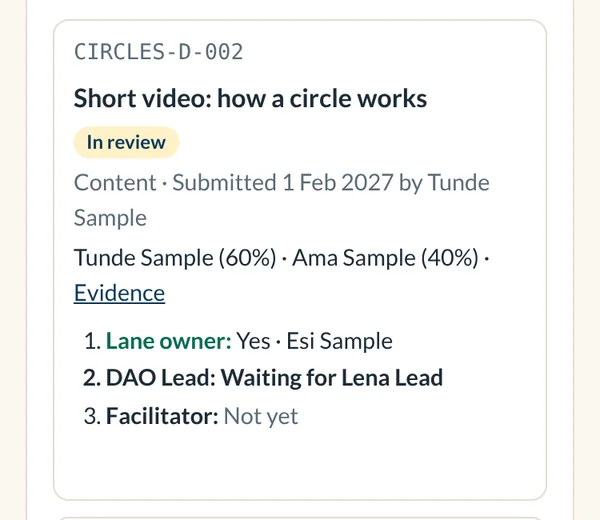
- Open your DAO and the Contributions tab. Your deliverable is in Deliverables, with its code (for example CIRCLES-D-004), its name and a status tag.
- Use Show and Lane to find it faster. Show offers All (not withdrawn), In review or to fix, Verified and Withdrawn.
- Read the three steps under it, in order: Lane owner, DAO Lead, Facilitator.
- Yes · Name: that person said Yes.
- Waiting for Name or Name: the step is next, and these people can review it.
- Not yet: an earlier step must say Yes first.
- No · Name, with a note in quotes: the reviewer asks for changes.
- If the status is Changes requested, read the note. Tap Edit, fix the deliverable or its evidence link, and tap Save and send for review. The status goes back to In review and the review starts again at Lane owner.
- When all three say Yes, the status becomes Verified and the line shows Verified with the date.
- Paid task: next to each person's name you see their share and amount, for example "Ana (50%, 25.00 USDT)".
- Scroll down to Verified per person to see your totals.
Good to know
- Nobody reviews work they have a share in or submitted. If a reviewer has a share, another person reviews that step. The line then shows Stand-in: with a name and the reason.
- You can Edit your deliverable while it is In review until someone says Yes in this round, and when it is Changes requested. The person who submitted it and anyone with a share can edit it.
- Withdraw takes a deliverable out of review. The app asks Withdraw this deliverable? It stays in the list as withdrawn. Afterwards it shows as Withdrawn. Only the person who submitted it and anyone with a share can withdraw it, before it is Verified. The DAO Lead and the Facilitator say No with a note instead.
- A Verified deliverable is locked. Nobody can edit, withdraw or delete it, even if a person later leaves the DAO.
- Earlier "No" answers stay visible, for example Round 1: No from Name: “…”.
- When a deliverable is Verified, the app emails a confirmation to the DAO's group email (not to your own email). The line then shows Confirmation sent with the date and address. Until then it shows Verified · confirmation email pending.
- Verified per person: each Verified deliverable counts as your share of it (two people at 50% count 0.5 each). Payable (USDT) = rate of the paid task × your share, for Verified deliverables only. In review counts your deliverables that are in review or to fix.
- Payments are settled monthly through the framework, not in this app.
If something goes wrong
- Someone has already said Yes, so it can’t be edited now. Wait for the review to finish, or ask the reviewer to say No with a note.
- Only the person who submitted it or someone with a share can do this.
- A Verified deliverable can’t be changed.
- task_id not in the scheme: not paid until the DAO Lead adds it. Ask your DAO Lead.
- Nobody can review this step yet: the Facilitator names a stand-in. Nothing to do; the Facilitator will name someone.
- Someone reviewed it a moment ago. The list has been refreshed.