
Lane owners
Open an inactivity case
Updated 24 Nov 2026
This guide helps lane owners open a case about a member of their lane who has stopped taking part.
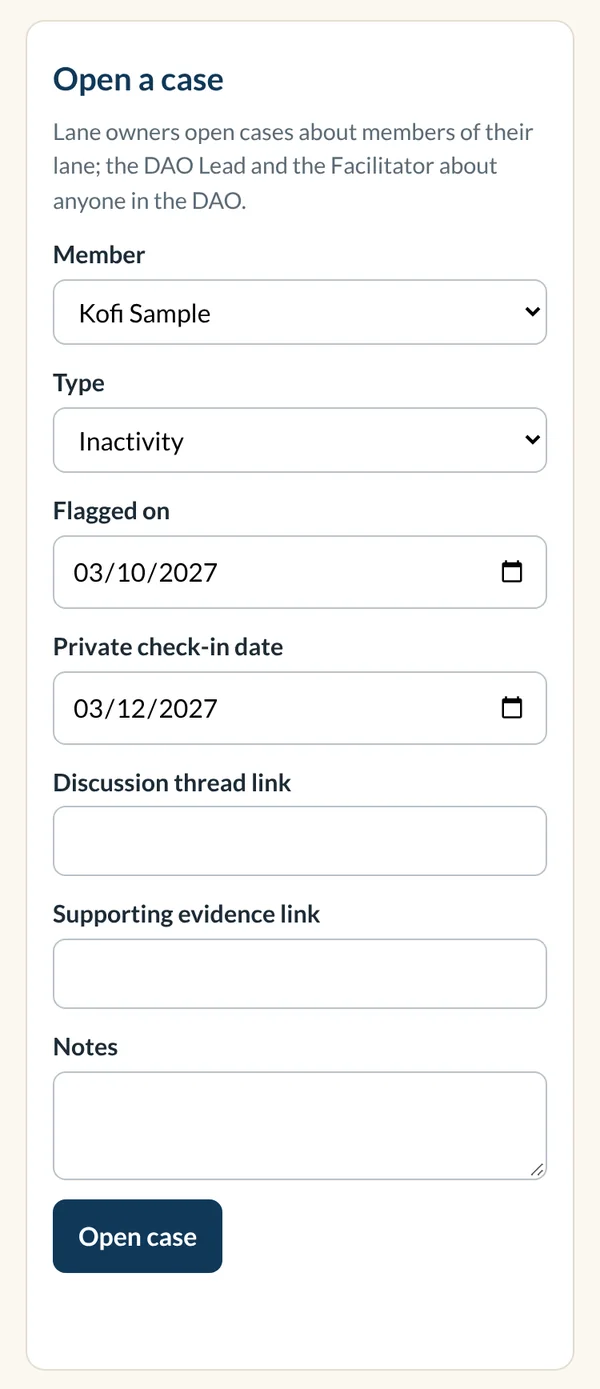
Steps
- First check the facts. On the Lane weekly page, look at Days since last activity for the member.
- Open your DAO and the Inactivity tab (or ☰ → Lane owners → Inactivity & misconduct).
- In Open a case, choose the Member. The list shows only members of your lane.
- Choose the Type: Inactivity, or Misconduct if it is about behaviour.
- Check Flagged on. It starts with today's date.
- If you already talked privately with the member, add the Private check-in date.
- If you have them, paste the Discussion thread link and the Supporting evidence link (starting with https://).
- Add Notes if they help, then tap Open case. The page says Saved. and the case shows under Cases.
Good to know
- A case goes step by step: Flagged, Check-in, Adjustment, Vote, Outcome. The steps reached are marked on the case.
- After the private check-in, the member has one week to adjust. The adjustment deadline is the check-in date plus 7 days. The app works it out.
- Only after that deadline can a removal vote be linked. The outcome is Ongoing, Re-engaged or Removed. Removed follows a DAO vote.
- After you open the case, the DAO Lead or the Facilitator updates it: check-in, vote and outcome. You can read it but not change it.
- Who sees the case: the DAO Lead, the Facilitator, Kambria Ops, you and the member it is about. The whole DAO sees it once it reaches the vote.
- The case shows Flagged by with your name and "Lane pair".
- You can open a case only about members of your lane. The member's lane is set in the Roster. The DAO Lead and the Facilitator can open a case about anyone in the DAO.
- Work already Verified is still paid, even if a member is removed.
- Cases are never deleted.
If something goes wrong
- There is no Open a case form: no member of your lane can be chosen. Ask your DAO Lead to check the Lane of your members in the Roster.
- Nobody opens a case about themselves.
- Cases are about members of this DAO.
- Add a link, starting with https:// A link does not start with https://.
- You can’t change this. The member is not in your lane.