
Facilitator
The confirmation email
Updated 24 Nov 2026
This guide helps the Facilitator understand the confirmation email sent when a deliverable is Verified, and send it again when it did not go.
Steps
- Give the last Yes on a deliverable (see "Review step 3 and stand-in reviewers"). The page says Sending the confirmation email… and then saves.
- When it worked, the deliverable shows Confirmation sent with the date and the DAO group email.
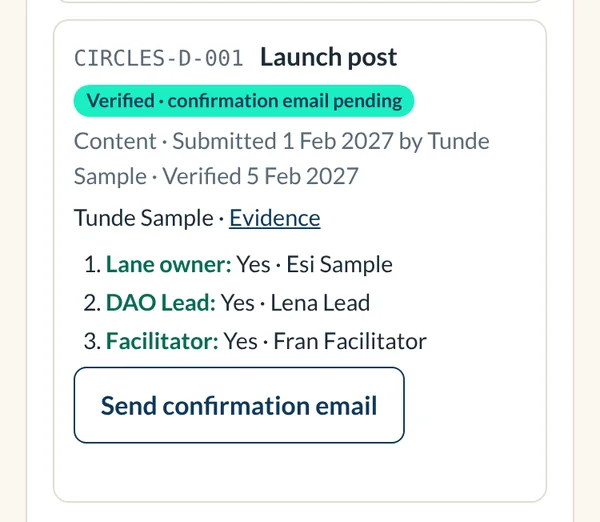
- When it did not work, the deliverable stays Verified and shows Verified · confirmation email pending. A message says why (see below).
- Fix the cause. For example, ask the DAO Lead to fill in DAO group email in DAO settings.
- Tap Send confirmation email on the deliverable. The page says Confirmation email sent to and the address.
Good to know
- The email goes to the DAO group email only, not to each member. It is a shared mailbox, set in DAO settings.
- The subject is the DAO code, "Verified:", the deliverable ID and its title, for example "[CIRCLES] Verified: CIRCLES-D-004 …".
- The email lists the deliverable, the lane, who did it (with person IDs and shares), the evidence link, the dates it was submitted and Verified, the three Yes reviews and the task_id of a paid task. For a paid task it also names the amount owed: the task and its rate, Owed to each person (rate × share, in USDT) and the Total owed. It links to the Contributions page.
- The email also says that a Verified deliverable is locked, and that a paid task is owed even if the person later leaves the DAO.
- Each Verified deliverable gets one confirmation email. Once it is sent, the button is gone and it can't be sent again.
- The Facilitator and the DAO Lead can press Send confirmation email. A step 3 stand-in's Yes also sends it.
- A failed email never undoes the Verified status.
If something goes wrong
- Verified. The confirmation email waits: this DAO has no group email yet (DAO settings). Ask the DAO Lead to add the group email, then press Send confirmation email.
- This DAO has no group email yet, so confirmations wait. The DAO Lead adds it in DAO settings (Group email), then presses “Send confirmation email”.
- Verified, but the confirmation email couldn’t be sent. Try “Send confirmation email” again later.
- Verified, but email sending isn’t set up yet. Kambria will fix it; then press “Send confirmation email”. Tell Kambria Ops.
- The confirmation email is already sent (or being sent). Refresh the page.
- Only the DAO’s Facilitator or DAO Lead (or the stand-in who said Yes at step 3) sends the confirmation.