
Kambria Ops
Give the DAO Lead and Facilitator roles
Updated 24 Nov 2026
This guide helps Kambria Ops name a DAO's DAO Lead and Facilitator, the two roles only Kambria Ops can give.
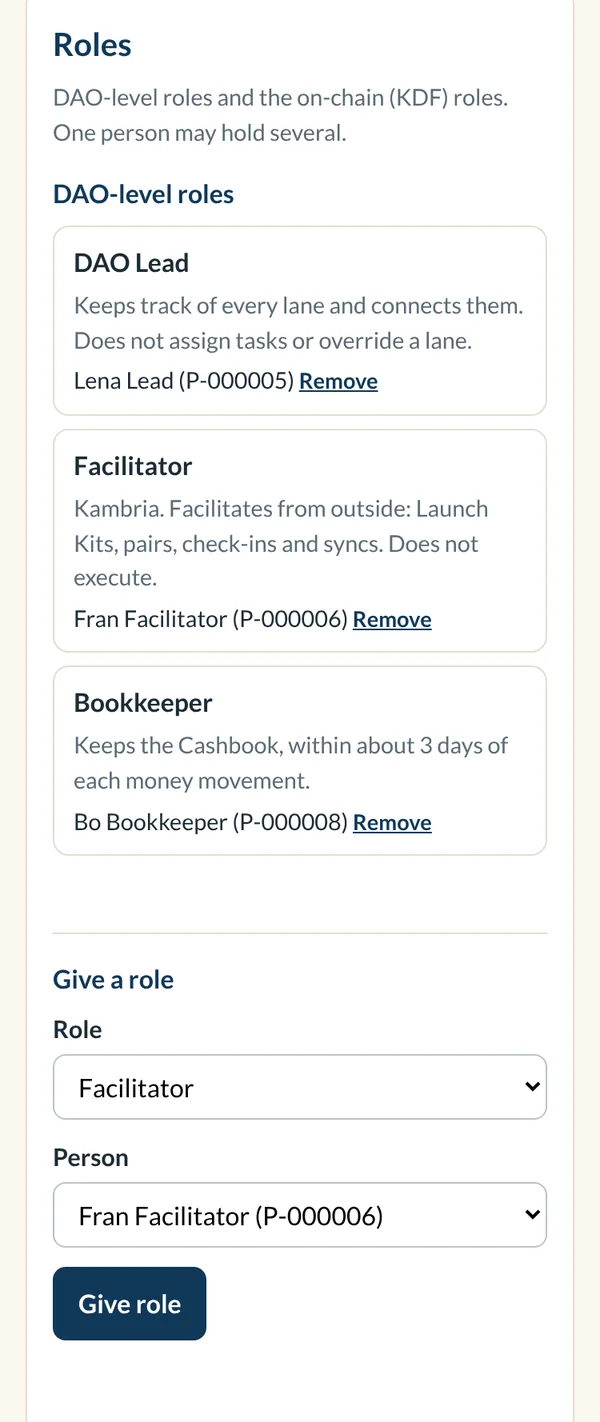
Steps
- Open the DAO and its Lanes & roles tab.
- Scroll to Roles. Under Give a role, choose the Role: DAO Lead or Facilitator.
- Choose the Person. The list shows the DAO's active members first, then everyone else in the app.
- Tap Give role. The page says Role given. and the name shows under the role.
End a role
- Under the role, tap Remove next to the person's name.
- The page asks, for example, Remove Amina Yusuf as DAO Lead? The change history keeps who held it. Confirm.
Good to know
- Only Kambria Ops name the DAO Lead and the Facilitator. The DAO Lead gives the other roles: Bookkeeper, Order Handler, Operator and Organizer. You can give those too.
- The Facilitator is from Kambria and doesn't need to be a member of the DAO. That is why you can choose anyone in the app.
- One person may hold several roles.
- Organizer is listed under KDF roles (on-chain permissions). In this app, the Organizer also runs KAT recognition.
- A Facilitator of any DAO can also open the Hub.
- Importing a Workbook gives the DAO Lead, Bookkeeper and KDF roles from the file, but never the Facilitator. Name the Facilitator here.
- Ending a role doesn't erase it. The change history keeps who held it and when.
If something goes wrong
- Role: Required. Choose a role first.
- Person: Required. Choose a person first.
- This person already has this role.
- You can’t change this. You are not signed in as Kambria Ops, or you are the DAO Lead and tried to give a role only Kambria Ops give.
- The person is not in the Person list: add them on the People page first, then refresh the page.