
Organizer
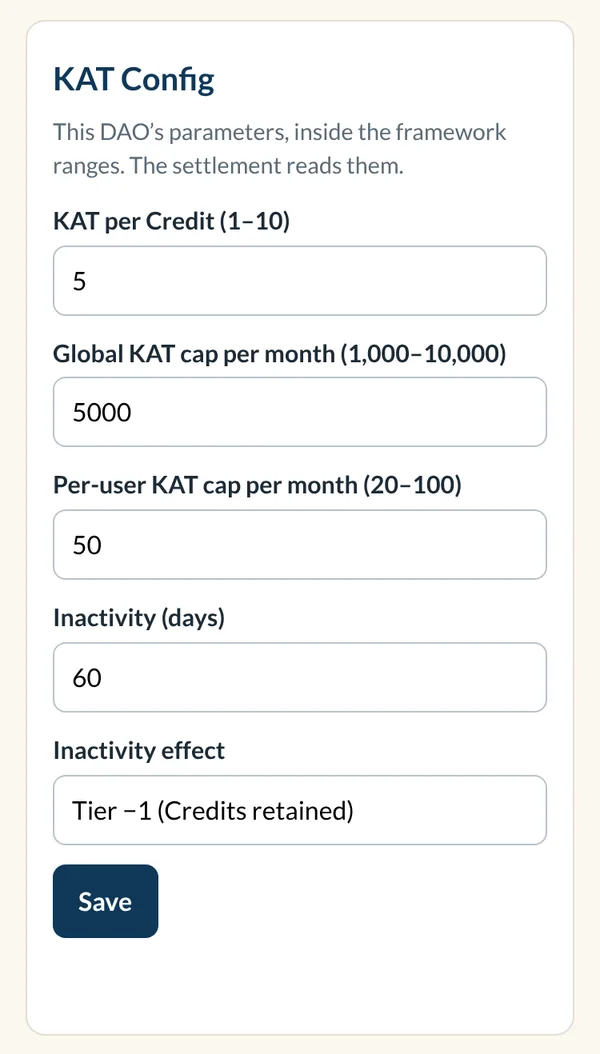
Set the KAT Config
Updated 24 Nov 2026
This guide helps the Organizer set the DAO's KAT parameters that the monthly settlement uses.
Steps
- Open your DAO and the KAT tab (or ☰ → Organizer → KAT).
- Scroll down to the KAT Config card.
- Set KAT per Credit (1–10): how many KAT one Verified Credit is worth before Karma and caps. Steps of 0.5 are allowed.
- Set Global KAT cap per month (1,000–10,000): the most KAT the whole DAO can issue in one month. Whole numbers only.
- Set Per-user KAT cap per month (20–100): the most KAT one person can get in one month. Whole numbers only.
- Set Inactivity (days) and describe the Inactivity effect.
- Tap Save. The page says Saved.
Good to know
- Every DAO starts with: 5 KAT per Credit, a global cap of 5,000, a per-user cap of 50, 60 days of inactivity and the effect "Tier −1 (Credits retained)".
- The ranges in the labels come from the KAT framework. You can't save a number outside them.
- Inactivity (days) is a whole number from 1 to 365.
- Until a month is settled, its draft settlement uses the Config as it is now. When you settle a month, the numbers used are kept with that month. Later changes do not change it.
- The app does not apply the inactivity effect by itself. The audit checks it before each settlement ("Inactivity handled per config").
- Everyone in the DAO can read the Config. Only the Organizer changes it, and every change is kept in the change history.
- The Credit Rules, Karma levels and Tiers & privileges below the Config are shared by every DAO. Kambria Ops keep them.
If something goes wrong
- Use a number inside the range shown. Check each number against the range in its label.
- The fields are read-only and there is no Save button: you don't hold the Organizer role in this DAO. Ask your DAO Lead.
- Couldn’t save. Check the fields and try again. Check your connection and try again.