
DAO Lead
Review step 2 of a deliverable
Updated 24 Nov 2026
This guide helps the DAO Lead give the second review of a deliverable and send the confirmation email.
Steps
- Open your DAO and the Contributions tab (or ☰ → DAO Lead → Contributions).
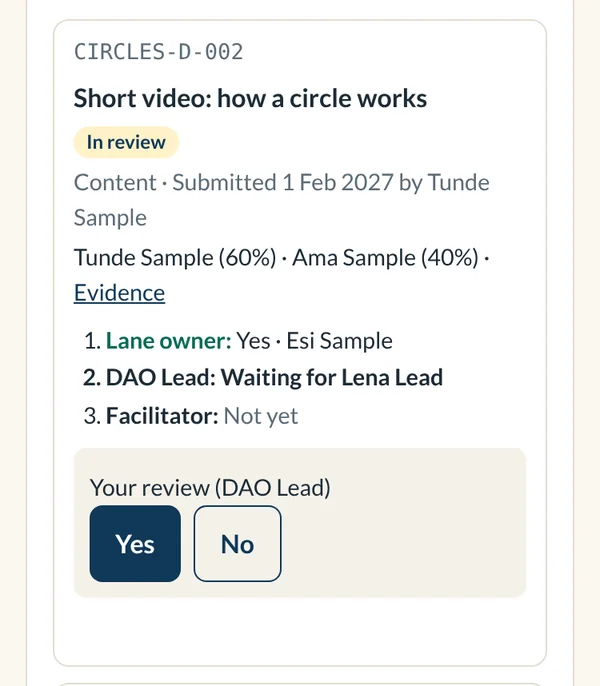
- In Deliverables, set Show to In review or to fix. Deliverables waiting for you show Waiting for and your name on the DAO Lead step.
- Tap Evidence and check the work against its Definition of Done.
- In Your review (DAO Lead), tap Yes if it is done. The deliverable then waits for the Facilitator.
- If something must change, tap No, write What needs to change? and tap Send No. The deliverable shows Changes requested.
- When a deliverable shows Verified · confirmation email pending, tap Send confirmation email. The page says Confirmation email sent to and the DAO group email.
Good to know
- The order is fixed: the lane owner first, then you, then the Facilitator. Three Yes make a deliverable Verified.
- You cannot review a deliverable you submitted or have a share in. You also cannot review step 2 if you gave the Yes at step 1. Then the step says Nobody can review this step yet: the Facilitator names a stand-in. The stand-in is shown on the step with the reason.
- After a No, the member fixes the work and sends it again. The review starts again from step 1, and earlier rounds stay visible.
- A Verified deliverable is locked. Nobody can change or withdraw it.
- Only the person who submitted a deliverable and the people with a share in it can Withdraw it. If a deliverable should not go ahead, tap No and say why in What needs to change?.
- The confirmation email goes to the DAO group email, not to each person. It is sent by itself after the Facilitator's Yes. Use the button only when it is still pending.
- If the DAO has no group email, add it in DAO settings first.
If something goes wrong
- Say what needs to change. A No needs a note.
- Someone reviewed it a moment ago. The list has been refreshed.
- You can’t review this step of this deliverable.
- A Verified deliverable can’t be changed.
- This DAO has no group email yet, so confirmations wait. The DAO Lead adds it in DAO settings (Group email), then presses “Send confirmation email”.
- The confirmation email is already sent (or being sent).
- Verified, but the confirmation email couldn’t be sent. Try “Send confirmation email” again later.
- Verified, but email sending isn’t set up yet. Kambria will fix it; then press “Send confirmation email”.