
Facilitator
Close the month
Updated 24 Nov 2026
This guide helps the Facilitator check the Cashbook's month-end view and close the month, with or without a lock.
Steps
- Open the Cashbook and tap Month-end at the top.
- Choose the Month.
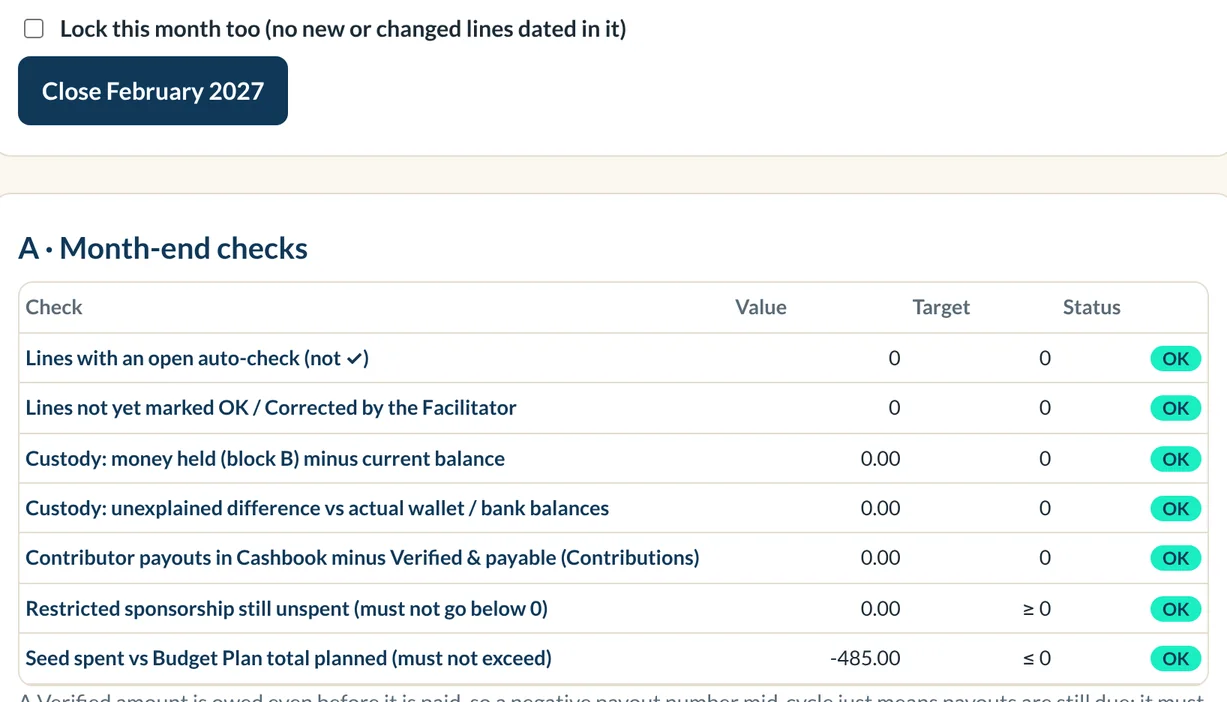
- Read block A · Month-end checks. Each check has a Value, a Target and a Status: OK or CHECK.
- For each CHECK, find the cause in the lines or in blocks B to E. Ask the Bookkeeper to fix it, or audit the open lines (see "Audit the Cashbook").
- When every status reads OK, the close button is active. It names the month, for example Close November 2026.
- Tick Lock this month too (no new or changed lines dated in it) if the month should not change any more.
- Tap the close button. The view then says when and by whom the month was closed, and adds locked if you locked it.
- Later, a closed month can be locked with Lock this month, or unlocked with Unlock this month.
Good to know
The five blocks are worked out from every line dated up to the end of the chosen month, with the spreadsheet's formulas:
- A · Month-end checks: the seven checks below.
- B · Custody: who holds the DAO’s money: per holder, what it received, sent out and should hold, the actual balance the Bookkeeper entered, and the difference.
- C · By funding source: in, out and remaining for each funding source.
- D · Budget vs actual, by expense category: the budget from the Budget Plan, what was spent, what remains and the share used. Spending with no budget shows unbudgeted.
- E · Income by category: income per category and its share of all income, and how much of it was regenerated (everything except seed and restricted sponsorship).
The seven checks of block A, and their targets:
- Lines with an open auto-check (not ✓): 0.
- Lines not yet marked OK / Corrected by the Facilitator: 0.
- Custody: money held (block B) minus current balance: 0.
- Custody: unexplained difference vs actual wallet / bank balances: 0.
- Contributor payouts in Cashbook minus Verified & payable (Contributions): 0.
- Restricted sponsorship still unspent (must not go below 0): 0 or more.
- Seed spent vs Budget Plan total planned (must not exceed): 0 or less.
More about closing:
- Only the Facilitator closes a month, and only when all seven checks read OK.
- A closed month can't be opened again. Its actual balances in block B can't be changed any more.
- Locking is optional. A locked month keeps its lines as they are: no line dated in it can be added or changed, and its lines can't be audited. Mistakes are then corrected with a line in an open month.
- Without a lock, lines dated in a closed month can still be added or changed.
- About check 5: a Verified amount is owed even before it is paid. A negative number in the middle of a cycle means payouts are still due. It must be 0 once the cycle is settled.
- The Hub shows the last closed month of each DAO, and whether it is locked.
If something goes wrong
- Every check in block A must read OK before the month can be closed. The close button stays grey until then.
- Every check in block A must read OK first. Something changed while you were looking. Reload the month and check block A again.
- This month is already closed.
- Only the Facilitator closes or locks a month. You are not this DAO's Facilitator.
- This month isn’t closed yet. Close the month before you lock or unlock it.
- Locked: lines dated in this month can’t be added or changed. Record corrections in an open month. Tap Unlock this month if a line in it must still change.
- Couldn’t save. Check the fields and try again.