
Members
Read the Roster
Updated 24 Nov 2026
This guide helps members read their DAO's Roster: who is in the DAO, their lane, role and status.
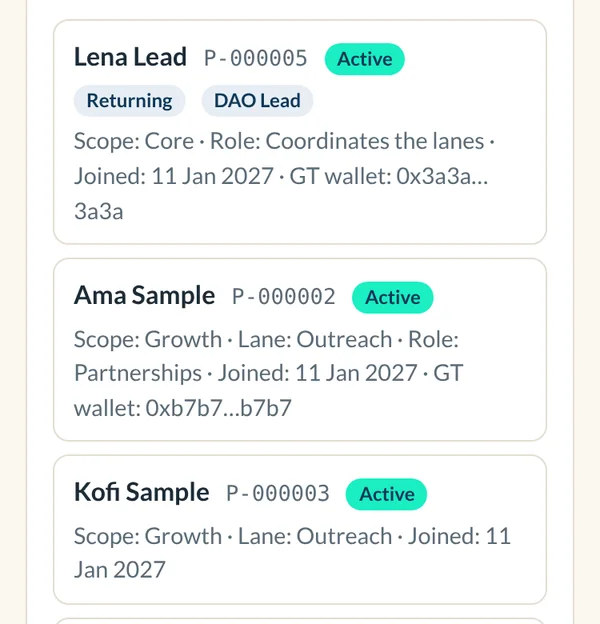
Steps
- Open your DAO and the Roster tab (or ☰ → Everyone in a DAO → Roster).
- Each row shows a person's name and person ID (for example P-000123), then tags: their status (Active, Inactive, Left or Removed), Returning if it applies, and any DAO roles such as DAO Lead or Facilitator.
- The small line below shows what is filled in: Scope, Lane, Role, Joined (the join date) and GT wallet (shortened).
- Active members are listed first, then the others, by name.
Good to know
- Everyone in the DAO can read the Roster. The DAO Lead and Kambria Ops can change it. Only Kambria Ops add people.
- Each member belongs to one lane, shown as Lane. If a member has no lane, there is no Lane part in their line.
- Returning means the person joined another DAO before they joined this one.
- Role is a free note about what the person does in the DAO. Roles such as DAO Lead and Bookkeeper show as tags; see Lanes & roles for what each role does.
- Joined matters: attendance is only scored from that day, so joining late does not lower anyone's score.
- Emails are not shown to members. Only Kambria Ops see emails.
- Your person ID stays the same in every DAO.
If something goes wrong
- Nobody is in this DAO yet.
- We couldn’t load this DAO. Please refresh the page.
- Your lane, join date or wallet is wrong: ask your DAO Lead to fix it.