
Bookkeeper
Fix a line: edits, queries and correcting lines
Updated 24 Nov 2026
This guide helps the Bookkeeper fix a Cashbook line: edit it, answer the Facilitator's audit, or add a correcting line.
Steps
Edit a line that is not locked:
- Open the Cashbook. In Show, choose Auto-check not ✓, Not audited yet or Queried by the audit to find the line.
- Tap Edit under the line. The form opens under it, filled in.
- Change what is wrong and tap Save line (or Cancel). The page says, for example, #12: Saved.
Answer an audit query:
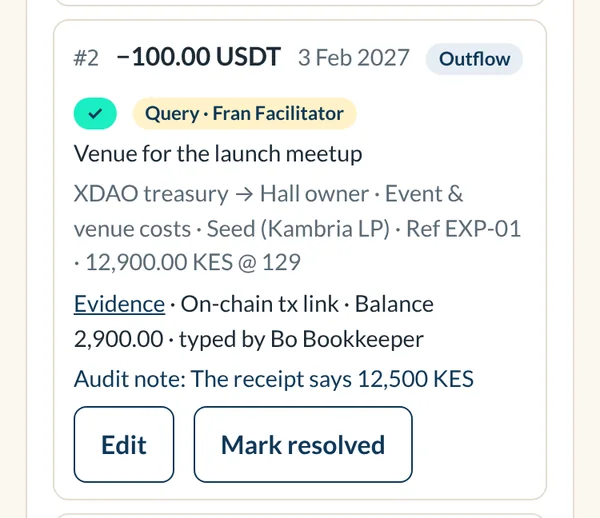
- In Show, choose Queried by the audit. These lines have the audit status Query, Missing doc or Amount mismatch.
- Read the Audit note on the line. It says what the Facilitator needs.
- Fix the line with Edit: for example add the Supporting doc (link) or correct the amount.
- Tap Mark resolved, check the Resolved on date and tap Save. The line shows Resolved with the date.
- The Facilitator then audits the line again.
Correct a locked line:
- Find the line. A line audited OK or Corrected has no Edit button; it has Add correcting line.
- Tap Add correcting line. The form at the top becomes Correcting line for #12, and the Description (what + why) starts with "Correction of #12: ".
- Fill in the line so that, together with the old line, the Cashbook is right. Finish the description.
- Tap Add line. The new line shows Corrects #12. Tap Cancel instead to go back to a normal line.
Good to know
- You can edit a line until the Facilitator marks it OK or Corrected. After that it is locked for everyone.
- Lines are never deleted. A mistake in a locked line is fixed with a correcting line.
- Mark resolved shows only when the audit status is Query, Missing doc or Amount mismatch. It records the date you fixed it; it does not change the audit status.
- Every change is kept in the change history.
- If the Facilitator has locked a month, lines dated in that month can't be added or changed. Record the correction in an open month.
- The line number and who typed the line never change.
If something goes wrong
- This line is audited OK, so it is locked. Add a correcting line instead.
- That month is closed and locked. Record a correcting line in an open month.
- That line number is not in this Cashbook. The line you correct must be a line of this DAO's Cashbook.
- Only the Bookkeeper changes a line. Ask your DAO Lead to check your role in Lanes & roles.
- Couldn’t save. Check the fields and try again.