
Organizer
Settle KAT for the month
Updated 24 Nov 2026
This guide helps the Organizer close a month of KAT: check the draft, wait for the audit and settle.
Steps
- Open your DAO and the KAT tab (or ☰ → Organizer → KAT).
- At the top, choose the Period (month) to settle.
- Make sure that month's Credits are verified or rejected and its Karma levels are set (see "Log and verify Credits" and "Set Karma").
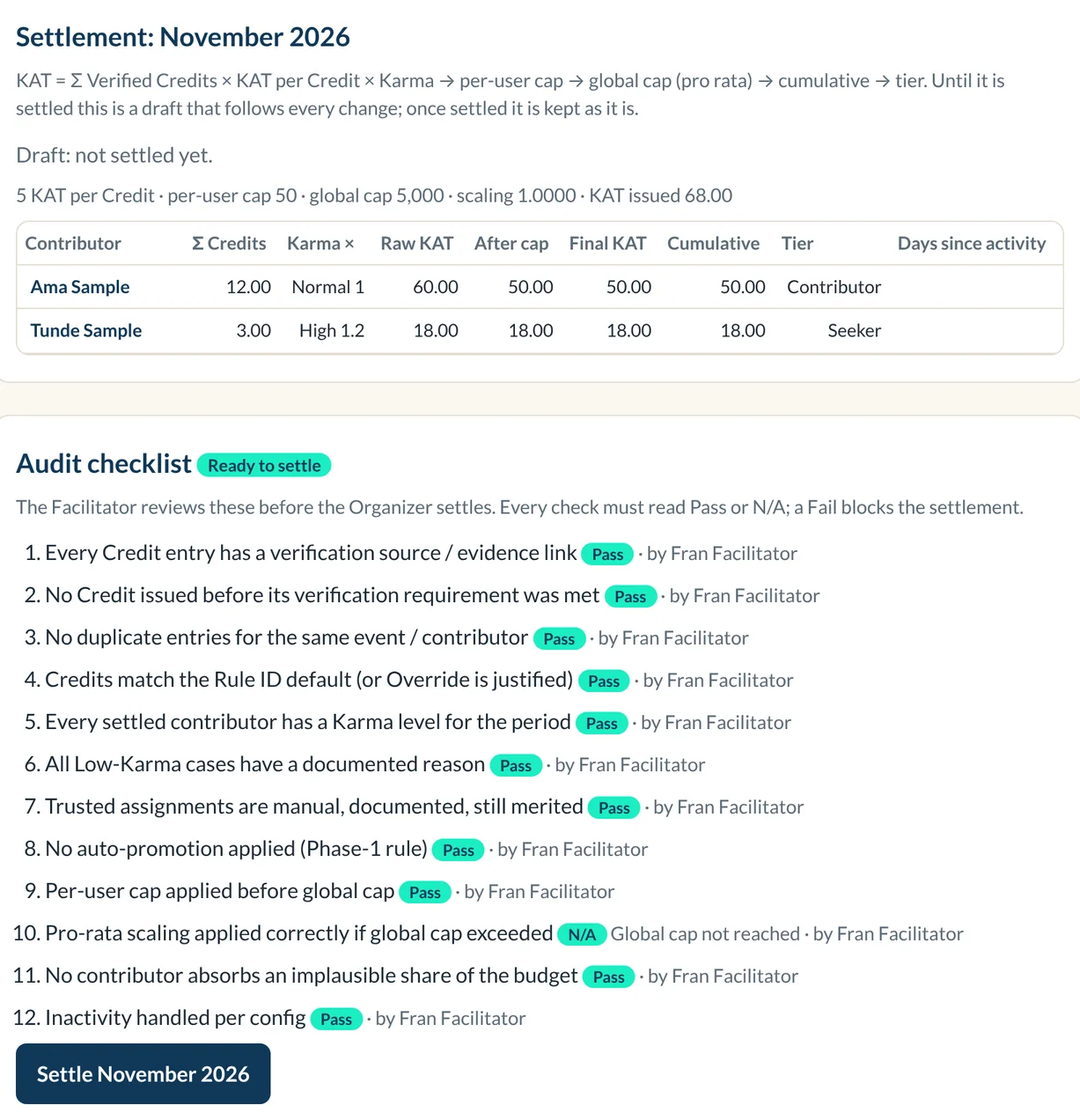
- Read the Settlement card. It says Draft: not settled yet. and shows each contributor's KAT.
- Ask the Facilitator to do the Audit checklist for the month. They mark each of the 12 checks Pass, Fail or N/A.
- When the checklist shows Ready to settle, tap Settle with the month's name.
- Confirm. The page says Settled: with the KAT issued, and the card says Settled with the date and your name.
Good to know
- The calculation, for each person with Verified Credits in the month:
- Raw KAT = Verified Credits × KAT per Credit × Karma multiplier.
- After cap: Raw KAT, but at most the per-user cap.
- If the DAO's total after cap is above the global cap, everyone is scaled down by the same share (pro rata). This gives Final KAT.
- Cumulative = the Final KAT of earlier settled months plus this month. It decides the Tier.
- Above the table you see the numbers used: KAT per Credit, the caps, the scaling and the KAT issued.
- Days since activity helps the audit check that inactivity was handled as the Config says.
- Until you settle, the table is a draft that follows every change to Credits, Karma and the Config. Once settled, the result is kept as it is.
- The audit status is Checklist incomplete until all 12 checks are marked. A single Fail makes it Blocked. You can settle only when every check reads Pass or N/A.
- Settle months in order. A month can't be settled while an earlier month with Verified Credits is not settled.
- After you settle, the month is locked: its Credits, Karma and checklist can't change any more.
- Only the Facilitator does the audit, and only the Organizer settles. Nobody audits their own work.
- Exception log: you and the Facilitator log corrections, violations and disputes, with the Date, Type, Contributor (optional), Description and Action / impact. Tap Log exception. Nothing in the log is removed.
- Members see only their own line and their KAT so far. The DAO Lead, Facilitator, Bookkeeper, Organizer and Kambria Ops see every line.
If something goes wrong
- All 12 checks must read Pass or N/A first. The Facilitator has not finished the audit.
- A check of the audit failed: the settlement is blocked. Talk to the Facilitator. Fix the cause (for example verify or reject entries, or set Karma), then they change the check.
- Settle the earlier periods first. Choose the earlier month and settle it.
- This period is already settled.
- Describe the exception. The Description of an exception is empty.
- This period is settled, so it does not change any more. You tried to change or correct Credits or Karma of a settled month. Log a Correction in the Exception log instead. (In a month that is not settled yet, fix a Verified entry with Correct this entry.)